

Pick by your pricing tool, your owners and your booking sites
Both are Airbnb Preferred+ software partners, publish every price and ask for no contract, so either is a sound property management system (PMS) to build on. Three things separate them for you: whether you'll keep PriceLabs or let Hospitable price your nights, whether you send owners statements, and which booking sites sell for you.
Choose Hospitable if
- Your listings are your own and you'll let Hospitable price them: Professional is $179 a month at 10 listings with pricing included, against $271.90 for OwnerRez with PriceLabs.
- You want guest messages running this week: it starts you with a written message for every stage of a stay, and its check-in message still reaches a guest who books late.
- You'll keep PriceLabs but stay under about 20 listings: Hospitable's ready-made messages cost $16 a month more at 5 listings and $52 at 10.
Choose OwnerRez if
- You'll keep PriceLabs on 20 listings or more: OwnerRez is $133 a month cheaper at 20, $178 at 25 and $405 at 50.
- You manage for owners: statements add $62 a month at 25 listings on OwnerRez, while Hospitable keeps them on Mogul at $30 a listing, $759 at 25.
- You sell past Airbnb, Vrbo and Booking.com: OwnerRez connects 34 booking sites directly, Homes & Villas by Marriott Bonvoy, Hopper Homes and HomeToGo among them. Hospitable connects those three and Agoda, and lists your direct-booking site on Google Vacation Rentals only on its Premium direct plan.
Neither connects Expedia directly. If it sells for you, my Hostaway review covers a system that does.
What OwnerRez and Hospitable cost at 10, 25 and 50 listings
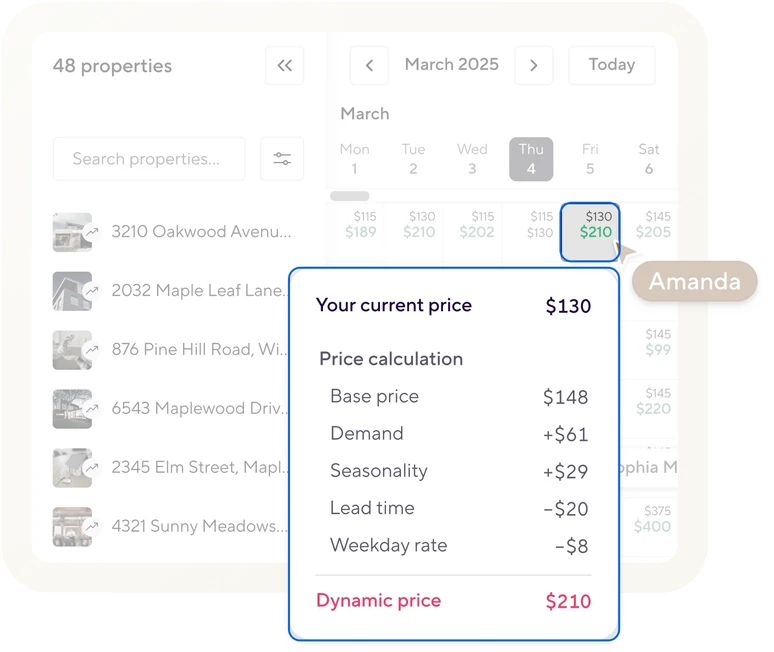
OwnerRez's price is below Hospitable Professional's at every listing count, but OwnerRez has no dynamic pricing of its own. You set its rates by hand, or connect a tool such as PriceLabs that sends it a rate for every night, each day. Hospitable's paid plans price each night themselves, from a base price moved by demand, season, lead time and day of the week. Add PriceLabs to OwnerRez's bill, and Professional is the cheaper setup at every size from 5 to 50 listings. Keep PriceLabs on both, and OwnerRez is cheaper at every size.
| Plan | 10 listings | 25 listings | 50 listings | What you get for it |
|---|---|---|---|---|
| OwnerRez | $127 | $226 | $374 | Direct connections to 34 booking sites, one inbox, templates and triggers, e-signed rental agreements, free logins. No dynamic pricing |
| OwnerRez with PriceLabs | $271.90 | $525.75 | $848.50 | PriceLabs sets each night's rate and minimum stay and sends them to OwnerRez once a day |
| Hospitable Professional | $179 | $404 | $779 | Its own dynamic pricing, every message rule, automatic answers to common questions, two smart devices a listing, a direct-booking site at 1% a booking |
| Hospitable Professional with PriceLabs | $323.90 | $703.75 | $1,253.50 | For keeping PriceLabs' rules; Hospitable's own pricing goes unused |
| OwnerRez with Property Management | $165 | $288 | $461 | Owner statements, commissions and expenses; a pricing tool is extra |
| Hospitable Mogul | $309 | $759 | $1,509 | Owner statements, portal and accounting, its own pricing, and AI that answers guests by itself |
If you haven't settled on a pricing tool, the best Airbnb pricing tool comparison puts PriceLabs beside Wheelhouse, Beyond and Hospitable's own.
Monthly, in US dollars, before tax. Hospitable takes 12% off if you pay a year up front, but that year can't be refunded once your trial is 30 days old, and its free Essentials plan can't connect PriceLabs at all. On OwnerRez, door locks from Schlage, Igloohome and Hubitat are $4 a lock, where Professional includes two smart devices a listing. Rezzy AI, OwnerRez's AI for guest replies, is $9 a listing; Hospitable's AI answers guests by itself only on Mogul.
How much of the messaging is done for you
Messaging is what I'd choose on; it's why I moved my own rentals off Guesty Pro. Both of these send automated messages from one inbox across Airbnb, Vrbo and Booking.com. They differ in how much is written before you start, how many parts each message has, and what happens when a guest books late.
Hospitable: one rule per message, already written
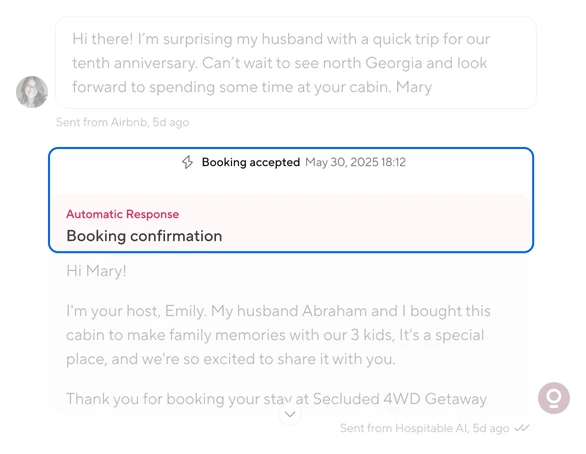
Hospitable starts you with a written rule for each stage of a stay: the reply to an inquiry, the booking confirmation, check-in instructions, a first-morning hello, the checkout reminder and the review request. Short codes fill in each listing's address, house manual, directions and house rules. You edit the wording, choose the listings and booking sites the rule covers, and switch it on. Paid plans also spot common guest questions, such as Wi-Fi or air conditioning, and draft or send the reply you wrote for each. For anything else, AI drafts a reply when you ask.
Hospitable: the rules wait for a listing
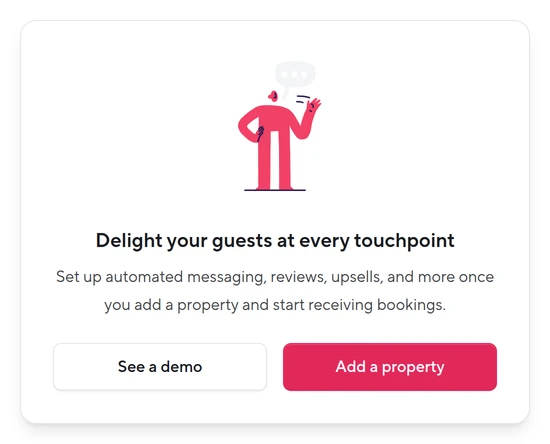
With no listing connected, every messaging page in Hospitable's trial showed us this panel instead of the written rules, so the three-message test waits on a connected listing.
OwnerRez: a template and a trigger for each message
OwnerRez emails its own receipts and payment notices, and a booking confirmation to direct and Vrbo guests, though none of those go to Airbnb guests. Everything in your own words takes two parts: a template, and a trigger that sends it on an event such as a new booking, or at a time before or after arrival or departure, narrowed by property, booking site or guest. Its setup wizard switches on four written messages too, a booking confirmation, a welcome email seven days before arrival, a checkout reminder and a review request, none of them with a retry. Its library adds ready-written templates and matching triggers stage by stage, and each trigger arrives as a draft for you to check: its arrival message comes set to send only to bookings paid in full with a security deposit scheduled. AI reply drafts come with Rezzy AI, at $9 a listing.
When a guest books late
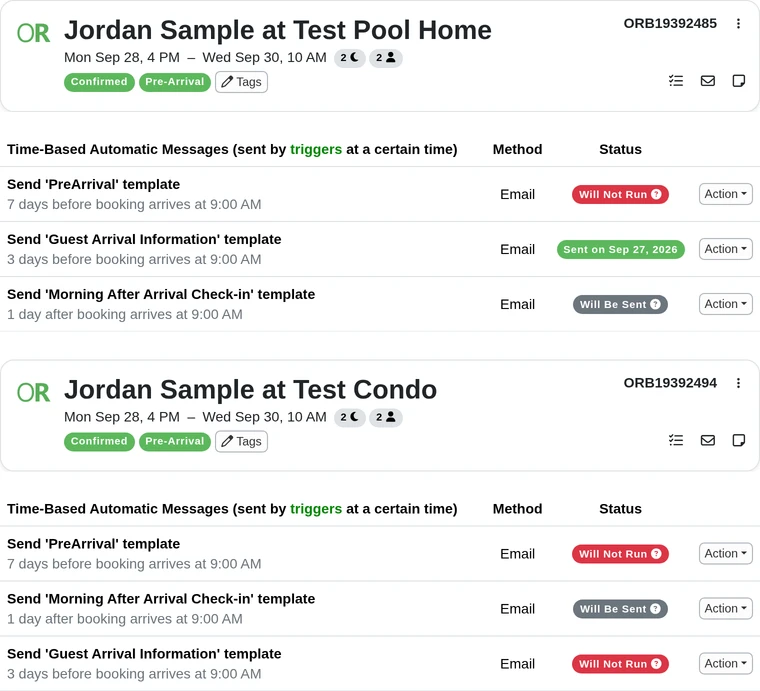
Time your check-in instructions for three days before arrival, and a guest who books the night before has missed that time. Hospitable sends them anyway, 30 minutes after the booking, unless you've ticked Exclude last-minute bookings. OwnerRez skips that guest unless the trigger retries, and the retry waits for its own hours. We booked the same late guest at two OwnerRez properties at 6 in the morning: with Every day until arrival set, the arrival details went out at 9:10, ten minutes after the retry's 9:00 start; without it, OwnerRez marked them Will Not Run and they never went. Give every arrival trigger a retry before a real guest books late.
What that head start costs depends on your pricing tool. If you'd use Hospitable's, nothing: Professional is the cheaper setup anyway. If you're keeping PriceLabs, it's $52 a month at 10 listings, $133 at 20 and $405 at 50, and each listing past 20 adds about $9.
Building OwnerRez's messages is a job you do once. Document once, delegate forever: write down what each trigger sends and when, and your assistant runs them from there. Under about 20 listings I'd pay for the head start. Past that I'd build the triggers and keep the difference, and if you're at 15 and heading for 40, choose for 40. No one wants to switch PMSs.
Test the late booking before a real guest does
Both trials run 14 days. Use one listing you can spare and connect it to one system at a time, so the two never push to the same calendar. Connect it to Hospitable before you time anything: with no listing in, its message rules stayed locked.
Three messages: in each trial, get the booking confirmation, check-in instructions three days before arrival and a checkout reminder live on that listing. Start Hospitable from its written rules and OwnerRez from its library, and time both.
A late booking: three days after you set up the messages, add a manual booking that arrives the next day, with yourself as the guest, and in Hospitable tick Manual in each rule's platforms. Hospitable should send the check-in instructions within 30 minutes. OwnerRez sends them only if the trigger has a retry, and then inside the retry's hours: ours went at 9:10 AM, ten minutes after the retry's 9:00 AM start.
The prices: once the listing has imported, preview Hospitable's pricing on its calendar for your busiest month and, if you run PriceLabs, set the two side by side. Switching Hospitable's on means subscribing, which ends its trial.
The plan you'd pay for: Hospitable's trial runs on Mogul, its top plan. Keep Inbox AI's auto replies off, because Professional doesn't include them.
Hospitable is the one if you'd trust its prices: it costs less and runs sooner. On 20 listings or more with PriceLabs staying, OwnerRez's savings pay for the setup many times over. My Hospitable review and OwnerRez review cover the rest of each.
Put a person on what the automation misses
Automation sends what you planned. A guest locked out at 11 PM, a question no rule covers and a booking a trigger missed all need a person. Both give every teammate a free login held to the properties they cover: custom access on Hospitable's paid plans, where the inbox, calendar and tasks follow the listings you tick, and limited access on OwnerRez. Start your assistant's day on the messages waiting to go out and that day's arrivals. On OwnerRez a limited-access login can't open the Trigger Forecast, so that's each arrival's Messages tab, which it can.
Our property-management assistants already work in OwnerRez and Hospitable, and PriceLabs is one of the four tools they train on before they start and every month after, with the recordings sent to you. You direct the work. See what an Airbnb virtual assistant covers, or book a free consultation. Most placements take 3 to 4 days from the first call.