

Who Hospitable suits
Hospitable started with guest messaging and still leads with it: scheduled messages for each stage of a stay, AI-suggested replies, and cleaning tasks created from each reservation. Around that sit a channel manager for Airbnb, Vrbo, Booking.com and Agoda, its own dynamic pricing, a direct-booking site and, on the top plan, owner statements.
You can see every price before you sign up and leave when you like, since there's no contract. The 14-day trial runs on Mogul, the top plan, without a card, and it needs a real listing: we opened it with nothing connected, and Add property led only to connecting Airbnb, Vrbo or Booking.com.
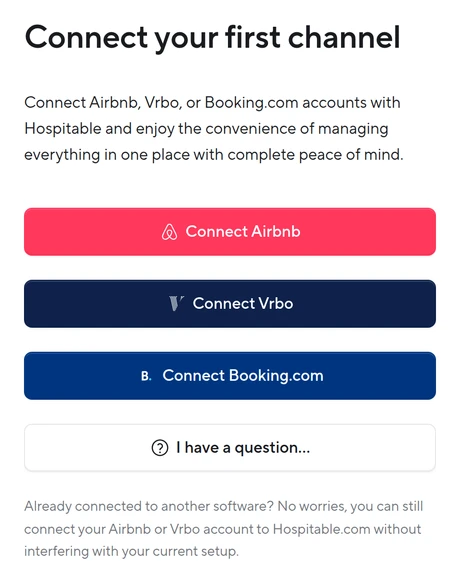
Until a listing is connected, the inbox, the calendar, the message rules, the cleaning rules and the pricing all wait for one. A property typed in by hand comes later: Hospitable allows it only once your connected Airbnb or Booking.com listings have at least three reviews between them, each of 4 stars or more. It's still the shortest path to automating listings you run yourself, owned or leased.
Buy it if
- The listings are yours, up to about 20, and guest messaging is the job you most want off your hands.
- You want dynamic pricing included instead of a separate tool.
- You want teammates at no extra charge, with the inbox, calendar and tasks held to the listings each one covers.
Skip it if
- You're heading past about 20 listings: the per-listing price never drops, and at 50 Professional is $779 a month.
- You manage for owners on a budget: statements and portals start on Mogul.
- You sell on Expedia: Hospitable's booking channels are Airbnb, Vrbo, Booking.com and Agoda.
Hospitable pricing at 10, 25 and 50 listings
Each paid plan is a base price that covers a few listings, then a fixed price for every listing after. Host stops at two listings, so an operator with five or more chooses between the free Essentials plan, Professional and Mogul.
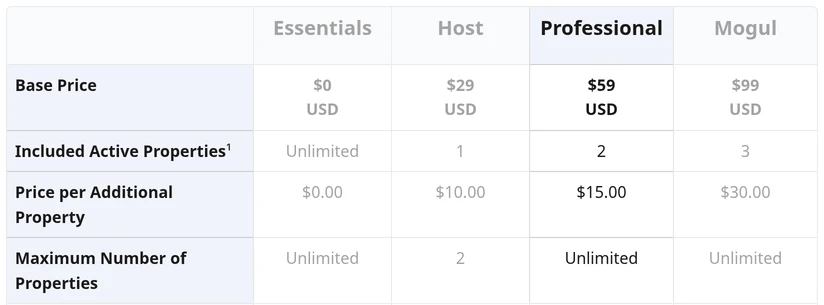
| Plan | 10 listings | 25 listings | 50 listings | What the plan adds |
|---|---|---|---|---|
| Essentials | $0 | $0 | $0 | Inbox, a limited set of scheduled messages, calendar sync, cleaning tasks; dynamic pricing $15 a listing after its trial |
| Professional | $179 | $404 | $779 | $59 with two listings, $15 each after: dynamic pricing, direct-booking site, smart locks, payments |
| Mogul | $309 | $759 | $1,509 | $99 with three listings, $30 each after: adds owner statements, portals and accounting |
| Host | No | No | No | $29 for one listing, $10 for a second, and no more than two |
Monthly, in US dollars, before tax. There's no contract and no onboarding fee on any plan. On the paid plans dynamic pricing is included for every listing with a check-in that month, and a listing with pricing on but no check-in costs $10. On Essentials it's free for your first 30 days or first 3 bookings, then $15 a listing a month. Each booking through the direct-booking site on Professional or Mogul pays Hospitable 1%, or 4% plus 3% processing on its Premium direct plan, which adds the Google Vacation Rentals listing.
What you'll work in every day
Prices you can see the reason for
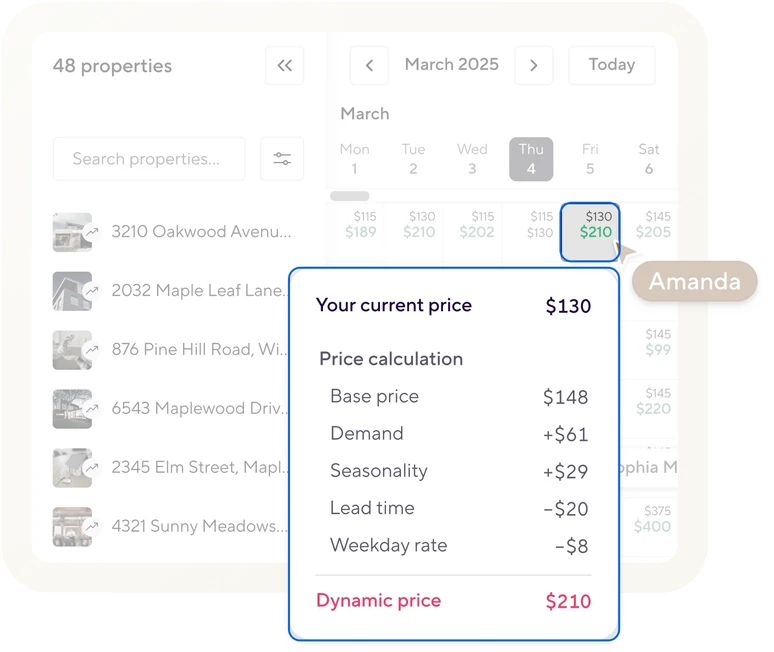
Hospitable's dynamic pricing sets each night from a base price, then shows the adjustments for demand, season, lead time and day of the week beside the price you're charging now. Once a listing has been imported, you can preview 180 days of its rates before you switch it on. In the trial, switching it on means subscribing, which ends the trial.
Cleans that schedule themselves
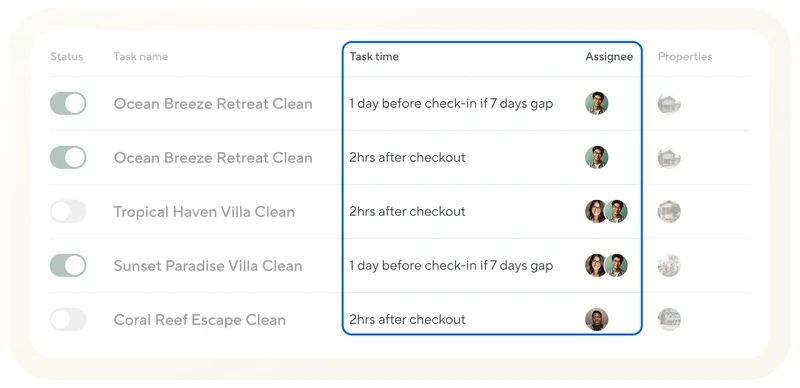
A task rule creates each clean from the reservation, a fixed time after checkout or a day before the next check-in when there's a gap, assigns it to your cleaner and sends the reminders. It works on the free plan too.
Teammates with custom access
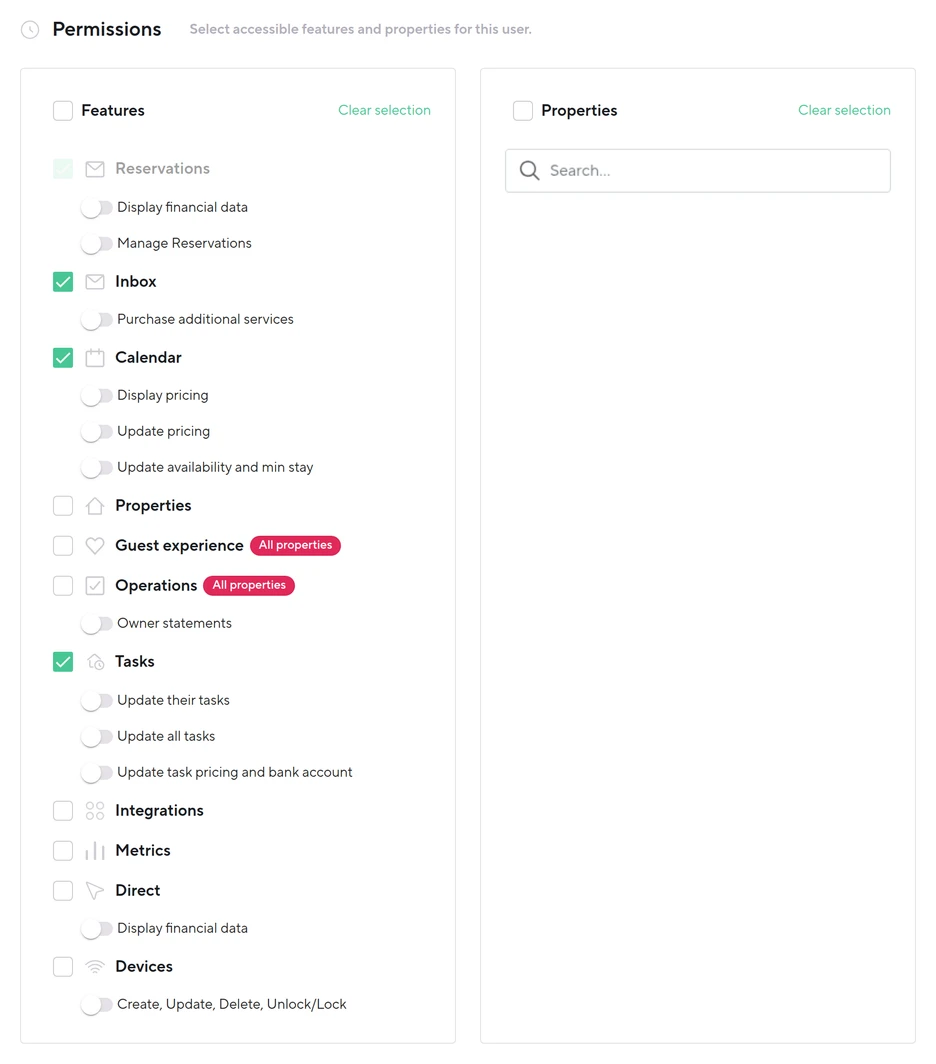
Custom access holds an assistant to the features you tick, and money, pricing and changes to reservations are separate switches, all off until you turn them on. Every login sees reservation dates and guest details, which can't be removed, and inbox access includes accepting or declining booking requests. Guest experience, where the message rules live, and Operations carry an All properties mark: tick either and the assistant reaches the rules for every listing. Full access opens everything but billing, invitations, API keys and muting or unmuting listings, your channel connections and integrations included.
Logins, which Hospitable calls secondary users, are free and unlimited from Host up. Its plan cards, in our trial and on its site, list them under Host and not under the free Essentials plan, and so does its help article on user types, though its comparison tables list them under Essentials too. Host stops at two listings, so count on Professional if your assistant needs a login.
Weakest at: the bill at 50 listings, and owners
Professional's $15 a listing is the same at listing 50 as at listing 3, so the plan that costs $179 at 10 listings costs $779 at 50. If you manage for owners, statements, portals and owner accounting are Mogul only, $309 at 10 listings and $1,509 at 50.
It connects four booking sites: Airbnb, Vrbo, Booking.com and Agoda. And the free Essentials plan keeps third-party integrations, smart devices and the direct-booking site for the paid plans, so an outside pricing tool such as PriceLabs means paying for a plan.
Let it run one listing for a week
We started this test in Hospitable's trial with nothing connected, and it stopped at the first step: every message, clean and price hangs on a connected listing. So connect one Airbnb, Vrbo or Booking.com listing the day you start the trial, and let Hospitable carry it for a week before you move the rest.
Messages: every scheduled message goes out on time, with the right door code and Wi-Fi for that listing.
A guest question: the AI reply it suggests uses your house facts, not a guess.
A turnover: the clean appears with the right timing and reaches your cleaner.
A change: move a booking a day and watch the calendar, messages and clean follow on every site.
Prices: once the listing has imported, preview Hospitable's rates for your busiest month. Switching them on means subscribing, which ends the trial.
Your assistant: invite them once the listing is connected, tick it under Properties, and check what their login shows. We invited ours with nothing connected and logged in as them: Home, Inbox and Calendar, all empty, billing and user management refused, and Add a property went nowhere. Hospitable's own words for an assistant at that stage: "Your account owner needs to connect at least one channel before you can use Hospitable.com."
If it passes and you'll stay under about 20 listings, it's the one. Comparing it with another system? Hospitable vs Hostaway puts the public plan next to Hostaway's quote, Guesty vs Hospitable next to Guesty's, Lodgify vs Hospitable shows where the two prices cross, and OwnerRez vs Hospitable counts the pricing tool OwnerRez needs.
Give your assistant custom access
Once your listings are connected, set your assistant up with custom access to the inbox, the calendar and the listings they cover, and leave financial data off unless they handle payouts. Leave Guest experience off unless they'll edit your message rules, since it opens the rules for every listing. Document once, delegate forever: record the first time you answer each kind of guest question, and it becomes their training.
Plug N Play's assistants work in Hospitable as well as the tools they train on. See what an Airbnb virtual assistant takes off your plate, compare the best Airbnb management software if you're still choosing, or book a free consultation.