

Who Guesty suits
Guesty is built for property managers. Pro connects Airbnb, Vrbo, Booking.com and Expedia by API and lists more than 60 channels, gives each owner a portal of their own, and sells accounting with trust accounting built in. Much of the rest, from pricing and websites to smart locks, damage protection and payments, is priced as add-ons.
I ran my own portfolio on Guesty Pro for a year. As we grew, support fell short, messaging wasn't reliable, and I could see the system wasn't built for the size we were heading to, so I moved everything to Hostaway. The switch took 5 to 7 days. No one wants to switch PMSs, which is why the test below is the one I'd run before signing.
Buy it if
- You manage other people's homes and want the owners portal, owner statements and accounting in the system you run guests from.
- You sell beyond the big three: Expedia is connected by API, and Pro lists 60+ channels.
- You'll negotiate the quote and read the contract before you sign.
Skip it if
- You want to see a price before a sales call. Hostfully's pricing is public: Growth is $249 a month at 10 listings, its $99 platform fee included.
- The listings are your own and you have no owners, so the portal and accounting would sit unused.
- You might need to step down: a lower package waits until your contract ends.
- You want to try it beside the system you run now. The free trial is Lite, which starts from your Airbnb account, and Guesty asks you to disconnect any other PMS from it first.
Guesty pricing: what's public, and what the quote has to cover
Guesty publishes a price only for Lite, which it sells for 1 to 3 listings. From four listings to 199 it sells Pro, and Pro is a quote.
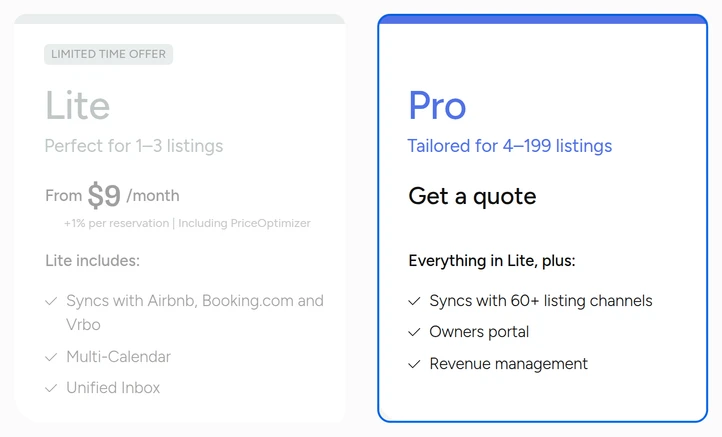
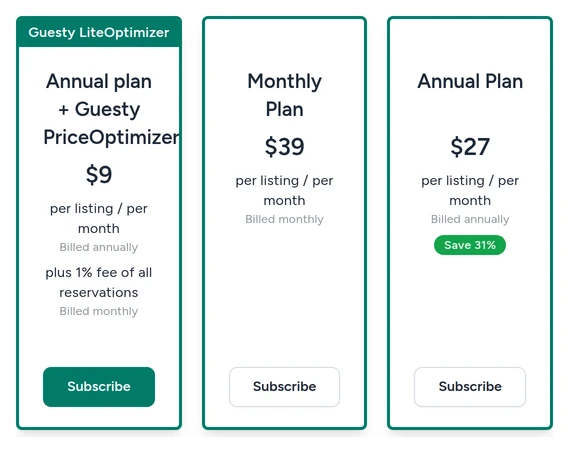
Lite's "from $9" is one of three prices. The billing page in its trial offers $9 a listing a month on an annual plan with PriceOptimizer, plus 1% of every reservation; $27 a listing on the plain annual plan; or $39 a listing month to month. For two listings that's $18, $54 or $78 a month, and the 1% makes the $9 plan dearer than the $27 one once the two take in more than $43,200 a year. Guesty's own Lite page starts its annual and monthly plans lower, at $20 and $29, so read the billing page before you subscribe.
The quote is where Guesty gets hard to compare, because so much is sold on top of Pro: PriceOptimizer, LocksManager, damage protection and its 24/7 Guest Communication Services on any plan, Guesty Pay and advanced websites on Pro and Enterprise. The Guesty Ultimate bundle packages the premium features, including Google Vacation Rentals and Homes & Villas by Marriott as channels, accounting and premium support, at what Guesty says is 40% off. Get these in writing before you compare:
| Ask for | Why |
|---|---|
| The monthly total at 10, 25 or 50 listings, whichever you'll be at in a year, as well as today | The price depends on how many listings you manage, and you'll grow into the second number. |
| Every add-on you'll use, priced: PriceOptimizer, LocksManager, damage protection, websites, Guesty Pay | Much of what makes Guesty useful is sold on top of the plan. |
| Onboarding, and what it costs | It's part of year one's price. |
| The card processing rate, if you'll take payments through Guesty Pay | It comes off every payment you collect. |
| The contract term, and what happens if you drop listings | You can upgrade any time, but a lower package waits until the contract ends. |
Then put the monthly totals beside the systems with public prices in the best Airbnb management software comparison, at the same listing counts.
What you'll work in every day
A shared inbox with an assignee on every thread
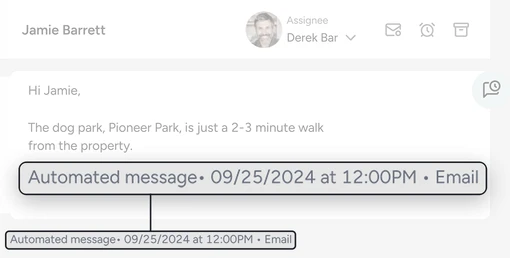
Messages from Airbnb, Vrbo, Booking.com, email, SMS and WhatsApp land in one inbox. Each conversation can be assigned to a teammate or handed over with notes, and ReplyAI can draft replies or send them for you. An automated message is marked as one in the thread, with the time it went out and the channel it went by.
Automated messages, one rule at a time
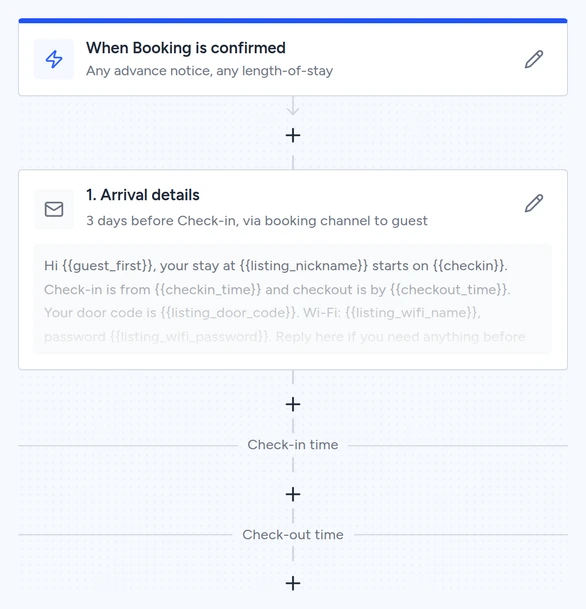
Each automated message is a rule in two halves: the bookings it applies to, by property, how far ahead the guest booked and how many nights, and the messages it sends at booking confirmation, check-in and check-out. On a multi-unit property, put the parent listing in the rule as well as its units. Guesty checks the rule before the booking moves to a unit, so a confirmation set only on the units never sends.
An owners portal you control
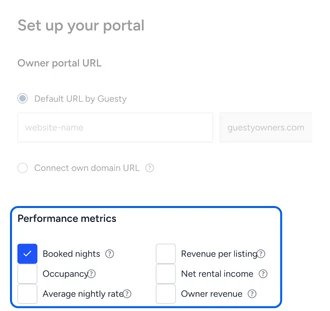
Owners get a portal and an app of their own, under your brand, where they see performance and statements and book their own stays. You pick which numbers each owner sees, and Guesty can generate monthly owner statements and 1099s for you to review before they go out.
Weakest at: a price you can't see, and the day-to-day
You can't put Guesty's price next to anything without a sales call, and the add-ons make two quotes hard to line up. In my year on Pro, the problems were support and messaging, and neither shows up on a feature list. Both can be tested before you sign, and they should be.
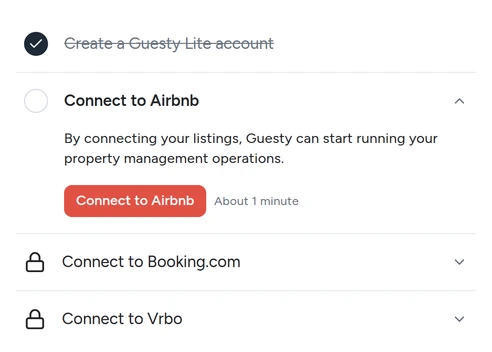
And you can't try Guesty beside the system you run now. Its 14-day free trial is Lite, and Lite starts from an Airbnb connection: until one is made, the inbox, the calendar, the listings and the tasks stay locked, and Guesty asks you to disconnect any other PMS from that Airbnb account before you connect it.
Test the two things that failed me
We ran the messaging test in Guesty's free trial. We built the check-in message and switched it on, and there the trial stopped: a test reservation needs a connected Airbnb listing. So ask for these in the demo, with your own listing details, before you sign anything.
Messages: have them set up your check-in message as an automation, trigger it on a test reservation, and watch it arrive at the time you set. Each message goes one way, by the booking site, SMS or email, so ask for two if you want both. Then book a guest for tomorrow: Guesty sends every message that's already due at confirmation, so a late guest can get two at once.
Support: Lite's help promises email support around the clock. Get what Pro includes in writing, then send a question on a Saturday evening and time the answer.
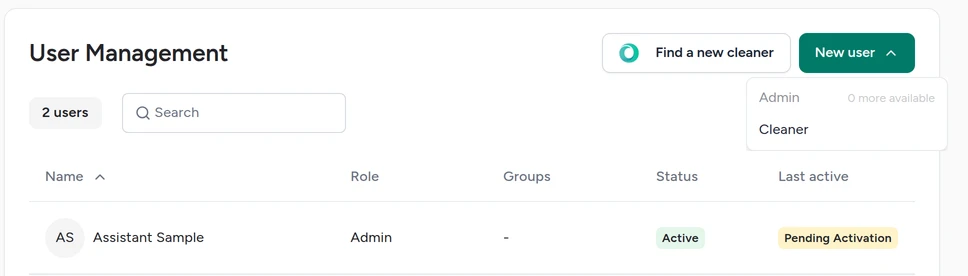
Access: log in as the person who'll answer your guests, with the role you'd give them, and check what they can and can't see. Do it in the demo, on Pro's roles: Lite has two, Admin and Cleaner, and logged in as our Admin assistant we could reach billing and your Delete user button.
Price: get the quote at the listing count you'll have in a year, with every add-on and the contract term on it.
If Hostaway is your other finalist, Hostaway vs Guesty lines up the two quotes, permissions and owner reports. Against Hostfully, Guesty vs Hostfully covers the fees and add-ons, and against Lodgify, Guesty vs Lodgify puts its owners portal beside a booking website. For listings you run yourself, Guesty vs Hospitable weighs its quote against a published plan.
Give each assistant a role, not your password
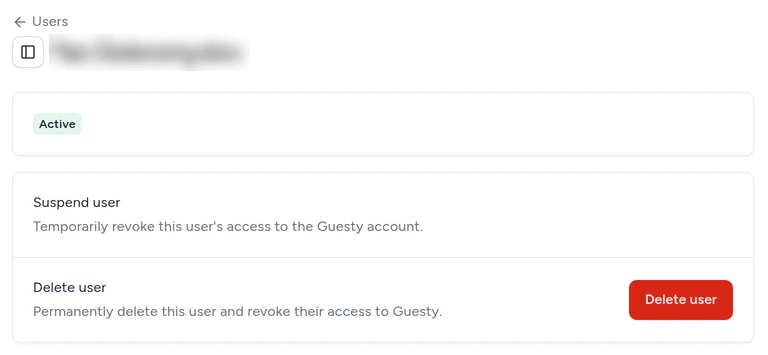
On Pro, Guesty controls what each user can see and do by role, and its own advice is to give each person the least access their job needs. For an assistant who answers guests, that's the inbox, the calendar and the reservations, with the financial reports left out. Lite has no such roles: an assistant who answers guests has to be an Admin, and Lite holds two admins. An Admin is a second owner. Logged in as ours, we reached Lite's billing page with its Subscribe buttons, and your own user page with your email and phone open to edit, Reset login and Delete user. Only your roles and permissions were refused.
Our property-management assistants train on Guesty before they start and every month after, with the recordings sent to you. See what an Airbnb virtual assistant takes off your plate, or book a free consultation to scope the role.