

Why my rentals run on Hostaway
I ran my portfolio on Guesty Pro for a year, and when it stopped keeping up I moved everything to Hostaway. The switch took 5 to 7 days, and channels, cleaning and smart locks now run from one place.
What sets it apart for an operator with a team is control. Each user can be limited listing by listing and section by section, down to whether they see a guest's phone number or any financial figure at all, and support answers the phone around the clock. No one wants to switch PMSs, so weigh that part harder than the feature list.
Buy it if
- You run a team, in-house or virtual, and each person should see only their listings and their part of the work.
- You manage for owners and want statements generated on a schedule and reviewed before they go out.
- You sell on Airbnb, Vrbo, Booking.com and Expedia and want every one of them on a direct connection.
Skip it if
- You want a price before you talk to anyone.
- You run a handful of your own listings and want the cheapest way to automate them.
- You have one listing: Hostaway puts single-listing hosts on a waitlist.
Hostaway pricing: what the quote has to cover
Hostaway doesn't publish a price. Its pricing page is three questions long, starting with how many listings you manage, and ends with a sales call. So the number that matters is the one in your quote, and the work is making that quote complete enough to hold up against a system with a public price.
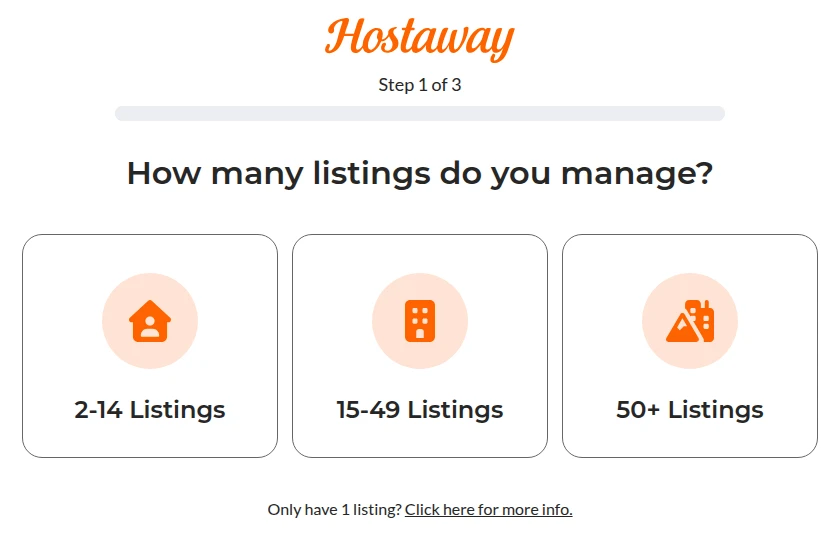
Get these in writing before you compare:
| Ask for | Why |
|---|---|
| The monthly total at 10, 25 or 50 listings, whichever you'll have in a year, and at today's count | The quote is priced on your listing count, so price the portfolio you're growing into. |
| Dynamic pricing, if you'll use Hostaway's own | It's a monthly fee per listing on top of the plan, set by how many listings you switch on and where they are. |
| The booking website and its fee | Bookings through Hostaway's own site carry a 1.8% fee on US listings paid through Stripe, charged to the guest unless you choose to absorb it. |
| Onboarding, and what it costs | It's part of year one's price. |
| The contract term, and what happens if you add or drop listings | Both change the bill after you sign. |
One cost comes with any property management system, Hostaway included. Once a PMS connects your Airbnb listings, Airbnb charges you its 15.5% host-only fee instead of splitting the fee with the guest. Keeping the same payout takes a markup on Airbnb nightly rates of about 14.8% if you weren't covering Airbnb's old 3% host fee, and about 18.3% if you were. In Hostaway a channel markup lifts nightly rates only, so cleaning and other fees still pay the full 15.5%.
Then put the monthly totals next to the systems with public prices in the best Airbnb management software comparison, at the same listing counts.
What you'll work in every day
Every listing linked to every site
Hostaway connects Airbnb, Vrbo, Booking.com, Expedia and Google through direct two-way connections, so bookings, cancellations, rates and availability move between them as they happen. Each account shows which of its listings are linked to a Hostaway listing and which still need linking. Check it after every listing you add.
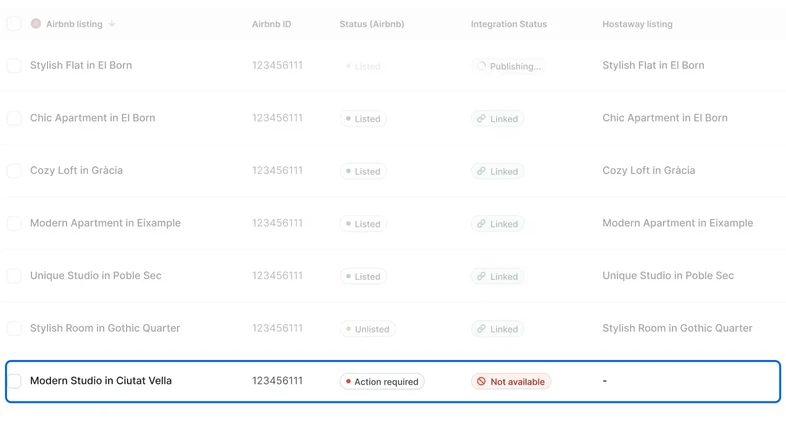
Owner statements on a schedule
Statements can generate themselves on the same day every month, as drafts you publish after a review or published straight away, and go to each owner by email as a PDF or an Excel file. Only a user with permission to create or modify statements can send one.
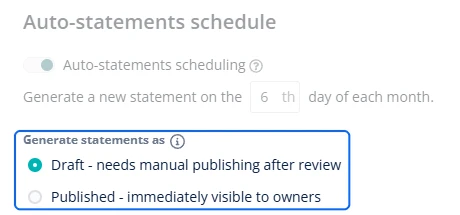
One inbox for every channel
Messages from Airbnb, Vrbo, Booking.com, email, SMS and WhatsApp land in one inbox, and each conversation can be routed to the right person on your team. Templates drop into the reply as you type, a guest's message translates in one click, and an AI reply waits to be edited or sent, with the listing's calendar and notes open beside the thread. When an automated message fails, the thread says so in red, which makes it easy to check for.
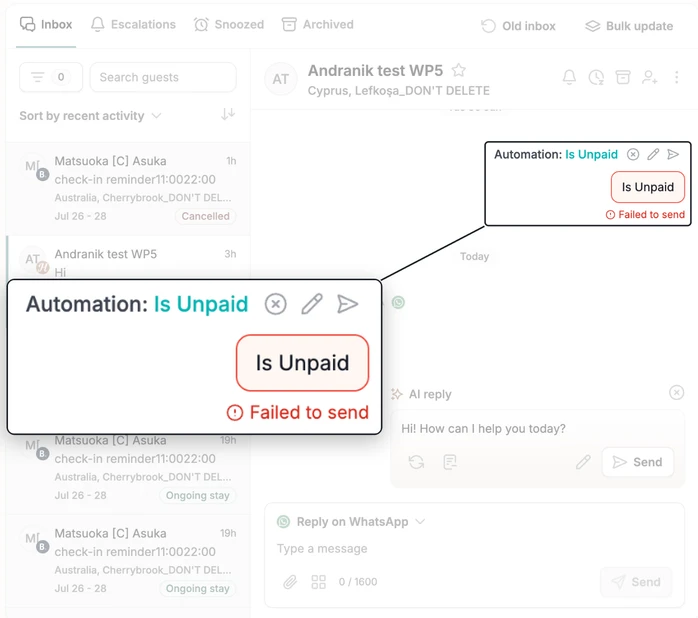
Weakest at: you can't compare it before a call
With no public price, Hostaway only lines up against another system once you've sat through a demo and collected a quote, and its own dynamic pricing and booking website add fees that a headline number leaves out. If you run a few listings of your own and need no owner statements or permissions, you're paying for a system built for a bigger operation.
Bring your team to the demo
Hostaway's case is the team and the owners, so test those, with your own listings and your own people, before you sign.
Your assistant: have sales create a user for the person who answers your guests, with guest names but no contact details and no financial data, and look at what that login shows.
An owner: generate a draft statement for one owner with one expense and one manual adjustment, then publish and email it.
A change: move a reservation a day and check the calendar on every site, the guest's messages and the cleaning task.
The quote: every line from the list above, at the listing count you'll have in a year.
Against Guesty, the other quote-only system, Hostaway vs Guesty lines up both quotes. Hospitable vs Hostaway puts a public plan next to it, and so does Hostaway vs Lodgify.
Set up your assistant's login first
The permissions are the reason to pick Hostaway, so use them from day one: your assistant gets the listings they cover, the inbox and the reservations, and no financial data unless they handle payouts. Our property-management assistants train on Hostaway before they start and every month after, with the recordings sent to you.
See what an Airbnb virtual assistant takes off your plate, or book a free consultation and we'll scope the role around your Hostaway account.