

Who should buy Hostfully
Hostfully is a property management system (PMS): channels, one calendar, one inbox, guest payments, owner statements and a booking site under your own name. It has made digital guidebooks since 2015, and connected to the PMS the guidebook does double duty: your guests read it on their phones, and the inbox drafts its replies from it. It's an Airbnb Preferred+ software partner and a partner of Vrbo and Booking.com.
I ran my portfolio on Guesty Pro for a year and moved it to Hostaway in 5 to 7 days, because support and messaging didn't keep up. No one wants to switch PMSs, so before signing I'd watch Hostfully's messages go out and log in as the person who'll answer my guests. With a virtual team, what each login can see decides more than the feature list.
Buy it if
- You want to work out the price before a sales call: the per-listing rates and the $99 platform fee are both public.
- You book guests direct, or plan to: every account comes with a booking site, and on Pro it takes no commission.
- You want a guidebook that answers arrival questions before they're asked, connected to your inbox.
Skip it if
- Your assistant shouldn't see revenue or nightly rates. No Hostfully role hides them.
- You want to try it before you pay. There's no free trial, only a demo.
- You want AI to answer guests on its own. Hostfully's AI drafts a reply, and a person sends it.
Hostfully pricing at 10, 25 and 50 listings, platform fee included
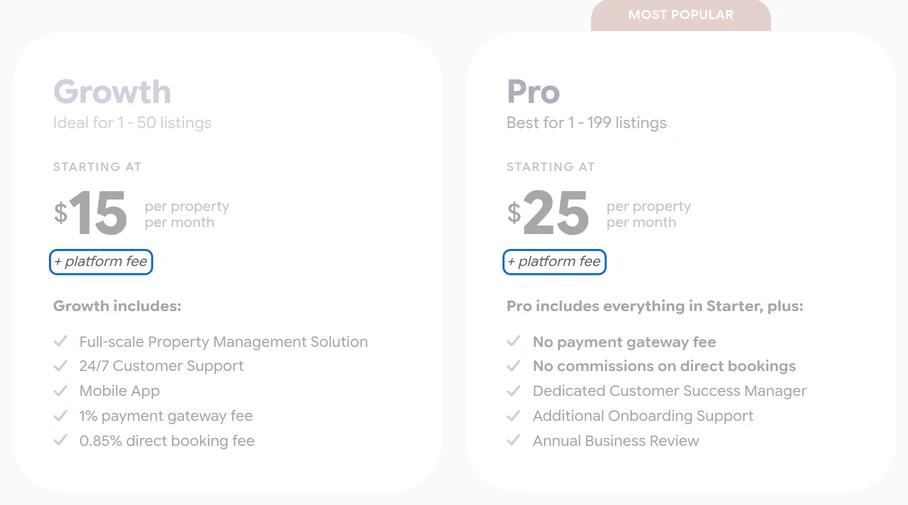
Growth starts at $15 a listing a month and is sold as ideal for 1 to 50 listings; Pro starts at $25. Every account also pays a platform fee, which the pricing page leaves blank: it's $99 a month, or $1,069.20 a year on yearly billing.
| Plan | 10 listings | 25 listings | 50 listings | What the price covers |
|---|---|---|---|---|
| Growth | $249 | $474 | $849 | $15 a listing plus the $99 platform fee. Takes 1% of each payment it processes through Stripe or PayPal and 0.85% of the rent on direct bookings. |
| Pro | $349 | $724 | $1,349 | $25 a listing plus the $99 platform fee. No payment or direct booking fees, a dedicated customer success manager and extra onboarding help. |
| Digital Guidebooks | Quote | Quote | Quote | An add-on. The first guidebook is free; after that you pay by the number you publish, at a price Hostfully doesn't publish. |
Growth's two fees fall only on money you collect yourself. Airbnb collects its guests' payments, so those bookings pay neither. Direct bookings paid through Stripe or PayPal pay both, and Vrbo or Booking.com stays you charge through them pay the 1%. Pro costs $10 more a listing and drops both, so it pays for itself once direct bookings pass about $540 a listing a month.
Monthly prices in US dollars at Hostfully's starting rates, so treat them as the floor of the quote. Monthly billing isn't discounted; yearly is. Hostfully doesn't refund a cancelled plan, any onboarding fee is non-refundable, and your data goes when the paid period ends, so export it first. Connecting Airbnb to any PMS moves your listings to Airbnb's host-only service fee, 15.5% for most hosts, and Hostfully can raise your Airbnb rates by a set percentage to keep your payout the same.
What you and your guests see every day
One inbox, with a reply drafted for you
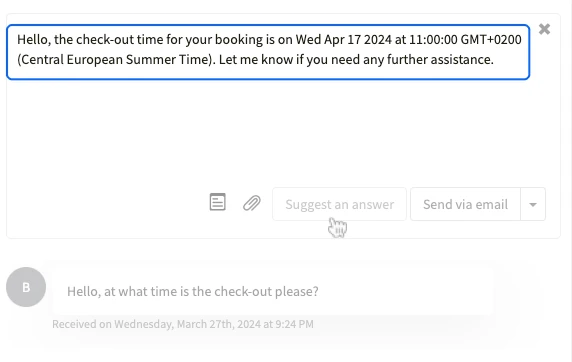
Messages from Airbnb, Vrbo, Booking.com, your booking site, email, SMS and WhatsApp land in one inbox, filtered by channel, property or the teammate each lead is assigned to. Suggest an answer has InboxAI draft a reply from your guidebook, the listing, the booking and past conversations. You edit it, then send it.
A guidebook your guests open on their phone
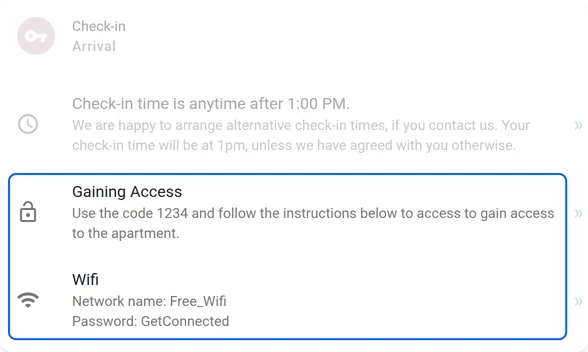
Each guidebook covers arrival, the house manual and checkout, with your local recommendations, and on the paid plan it translates into 16 or more languages. Its Marketplace tab sells early check-in, late checkout and extras, with a 1% Stripe fee on each sale. The better you fill it in, the better the inbox's drafts get.
A booking site on every account
Every account comes with a direct booking site under your name, where guests book and pay through your Stripe, PayPal or Vacation Rent Payment account. You're the merchant of record, so the cancellation policy and the refunds are yours to set. On Growth, each of these bookings pays the 0.85%, and the 1% too when the guest pays through Stripe or PayPal.
Weakest at: what your team can see
Hostfully has four team roles, Property Manager, Booking Agent, Property Sales Manager and Associate, and none of them can be changed. You choose which listings each person works on, not what they see there. For an assistant who answers guests, the fit is Booking Agent: the inbox and bookings for their listings, and every night's price and minimum stay on the calendar. Even the read-only Associate can see revenue and rates.
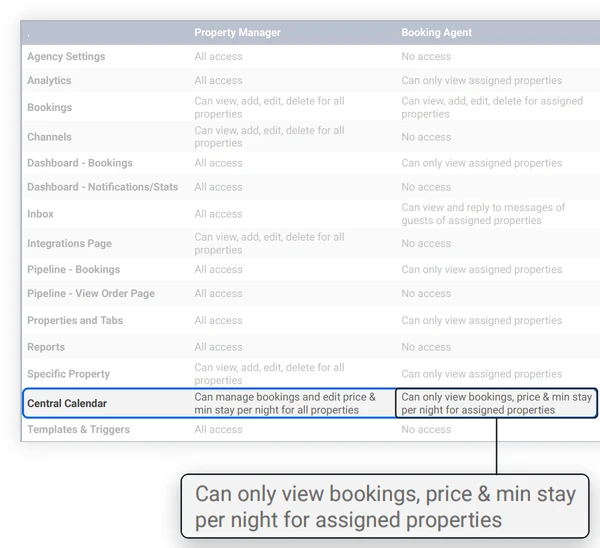
Hostfully says custom roles are planned. Until they arrive, the ways around it are a service provider login, which is built for cleaners and maintenance, and a read-only shared calendar.
Make the demo do the work of a trial
Hostfully has no free trial, so make the demo show you these before you sign.
The login: have them create a Booking Agent for your assistant and open the calendar as that user. Decide whether you're fine with what it shows.
A message: set up your check-in message as a trigger on a test booking and watch it reach the Airbnb thread and the guest's email.
Airbnb: ask them to push a listing to Airbnb and open its booking setting. Listings Hostfully pushes go live on Instant Book, and a bad guest is worse than no guest at all, so plan to switch yours to requests if you screen guests.
The quote: the plan your listing count gets, the platform fee, whether InboxAI is included, the guidebooks you need and any onboarding fee, in writing.
If Guesty is your other finalist, Guesty vs Hostfully lines up the two bills and the access test. Hostaway, which my rentals run on, limits each user listing by listing and section by section, down to whether they see any financial figure.
The guidebook is your assistant's manual too
Document once, delegate forever. In Hostfully, the guidebook is where the documenting happens: the check-in steps, the Wi-Fi, the house rules and the local tips your guests read, and the facts the inbox drafts from. An assistant who works your inbox checks each draft against it, keeps it current when something at the property changes, and moves inquiries and quotes along until they're bookings.
Our property-management assistants train on Hostaway, Guesty, PriceLabs and Turno before they start; on Hostfully, you walk yours through your account when they start, and give them the Booking Agent role on the listings they cover. See what an Airbnb virtual assistant takes off your plate, or book a free consultation; most placements take 3 to 4 days from the first call.