

Who OwnerRez suits
OwnerRez builds its own connection to each booking site instead of going through another channel manager, and every change you make, from rates and rules to availability and photos, goes out to the sites as you make it. It's my pick for the most booking sites per dollar in the best Airbnb channel manager comparison. The per-property price covers nearly everything: channel management, unlimited team logins with a portal for owners and cleaners, e-signed rental agreements, triggers and auto-responders. Six premium features cost extra.
I run my rentals through rental arbitrage, with no owners to report to, and for a portfolio like that the base price is most of the bill. Property Management, the add-on that makes owner statements, is built for managers who take guests' payments into a trust account and pay owners out of it. If that's you, it's $38 a month more at 10 listings.
Buy it if
- You want a published price that stays low as you grow: $374 a month at 50 listings, where Hospitable Professional is $779 with its own dynamic pricing included.
- You sell beyond Airbnb, Vrbo and Booking.com: Google Vacation Rentals, Homes & Villas by Marriott Bonvoy, Hopper Homes and HomeToGo connect directly too.
- Several people work in the account: every login is free, and each can be held to the properties they cover.
Skip it if
- You need Expedia directly: it isn't one of the 34, and a Vrbo listing with Instant Book may show there, with no guarantee.
- You want guest messages you don't have to check: the setup wizard switches on four written ones, but its welcome email skips any guest who books within seven days of arrival, and its checkout email, sent at 9 on checkout morning, talks about tomorrow's departure.
- You want AI answering guests across a big portfolio: Rezzy AI is $9 a listing a month, $450 at 50 listings, more than the base price.
OwnerRez pricing at 10, 25 and 50 listings
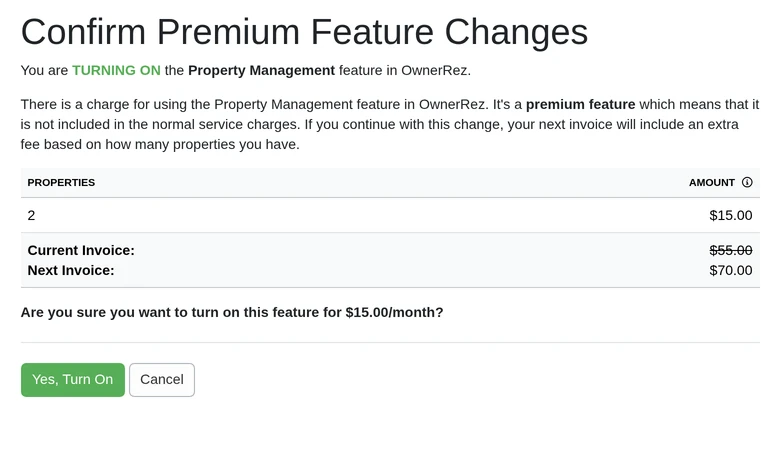
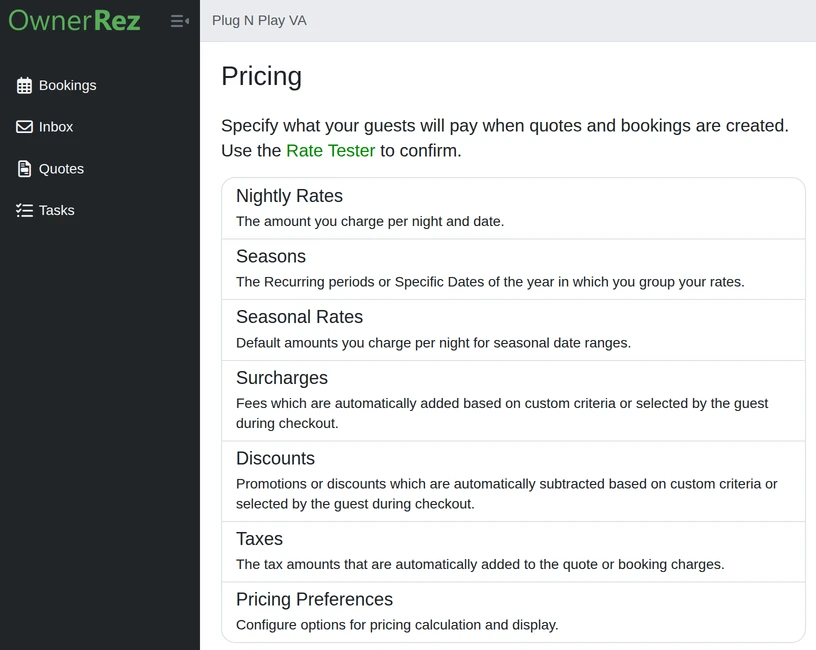
OwnerRez prices per property on a sliding scale: $40 for the first, $15 each for the second and third, $10 for the fourth, $8 each up to 9, $7 from 10 to 19, $6 from 20 to 49 and $4 from 50 to 99. There's no setup fee, booking fee or contract. The 14-day trial includes the premium features. Each one switches on or off from the billing page, which shows what it adds to your next invoice before you confirm: for our two test properties the invoice was $55 a month, and owner statements added $15.
| Plan | 10 listings | 25 listings | 50 listings | What it adds |
|---|---|---|---|---|
| OwnerRez | $127 | $226 | $374 | Channels, inbox, triggers, rental agreements, unlimited team logins, owner and cleaner portal |
| With Property Management | $165 | $288 | $461 | Owner statements, commissions and expenses |
| With a hosted website | $170 | $293 | $466 | A booking site on your own domain |
| With both | $208 | $355 | $553 | Owner statements and your own site |
| With Rezzy AI | $217 | $451 | $824 | AI replies to guests, at $9 a listing |
The best Airbnb management software comparison sets these totals against Hospitable, Lodgify and the systems sold by quote.
Monthly, in US dollars, before the sales tax OwnerRez now adds in several states. QuickBooks Online sync is $23 a month more at 10 listings, $38 at 25 and $63 at 50. Texting guests costs $15 a month for a number with 500 outgoing segments, then 1.5 cents each, and door locks from Schlage, Igloohome and Hubitat are $4 a lock. There are no refunds, but you can switch a feature off or cancel whenever you like. OwnerRez has no dynamic pricing of its own: nightly rates come from you or from a partner tool such as PriceLabs, $144.90 a month at 10 listings and $474.50 at 50.
What you'll work in every day
Messages that go out on triggers
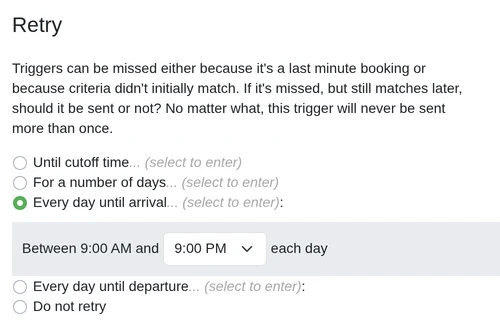
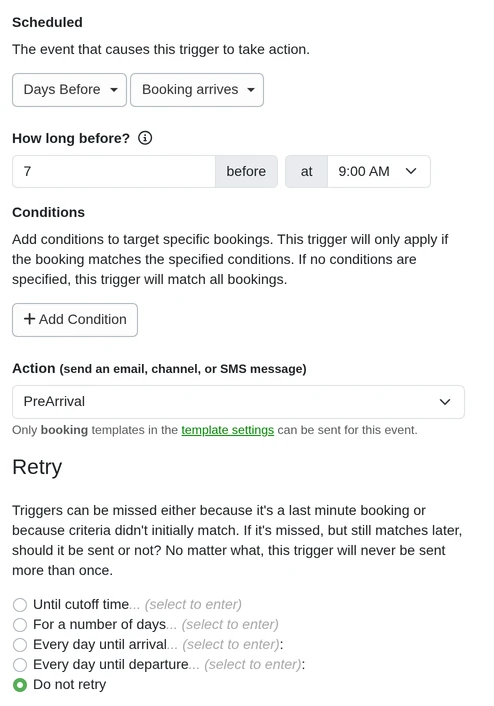
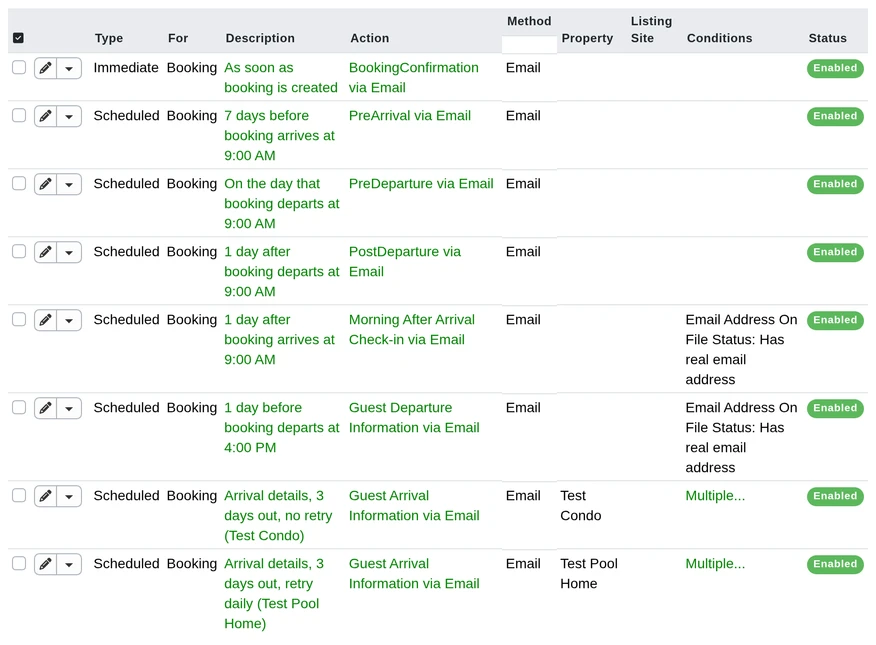
Each message you automate is a template plus a trigger. An immediate trigger sends it the moment something happens, such as a new booking, an inquiry or a signed rental agreement; a scheduled one sends it a set number of days or minutes before or after arrival or departure. Conditions narrow it to certain properties, booking sites or guests, so the door code can wait until the agreement is signed. Scheduled triggers also have a retry setting, and every one we made started on Do not retry: the three the setup wizard switched on and the three we took from OwnerRez's library, which also arrive as drafts that send nothing until you save them live.
One inbox for Airbnb, Vrbo, Booking.com and texts
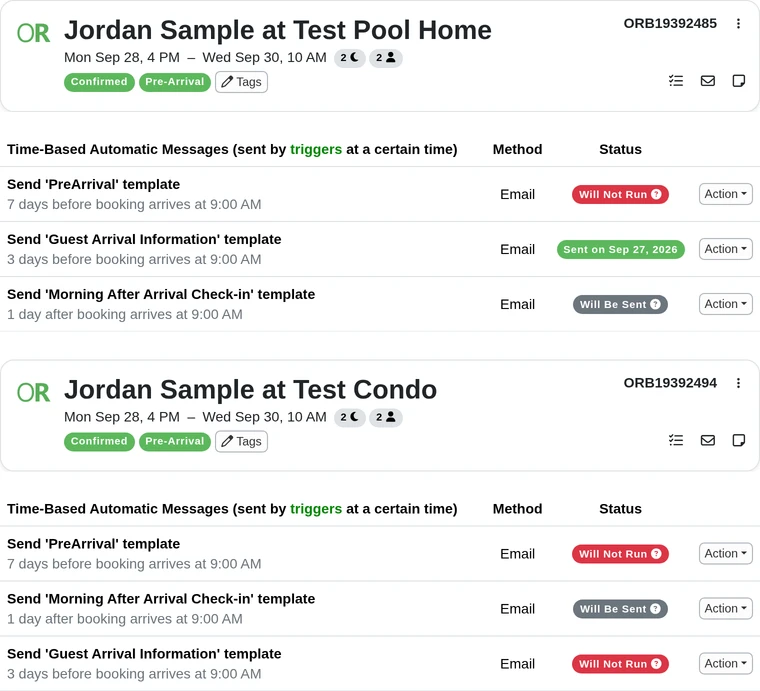
Guest messages from Airbnb, Vrbo and Booking.com land in one list, with texts and WhatsApp if you switch them on, and the guest's booking and balance sit beside each thread. Templates drop into a reply, and you pick the channel it goes out on. Email isn't in the inbox: after our test bookings had sent four guest emails, it still read No messages in Inbox. You see them on each booking's Messages tab, which lists every automatic message as sent, due, or Will Not Run, with Send Now beside it.
A login for each person, held to their properties
Every staff login is free. Limited access, set to the properties someone covers, lets them answer guests in the inbox, edit those bookings, send quotes and work tasks, with each booking's charges and payments in view. Full access is a copy of you, with boxes to make it read-only or to hide your reports and your billing, and OwnerRez's help says it can't invite more staff. The invitation starts on Limited access with the assistant's notifications off, though a warning above it still says the invite gives full admin access to everything, and its link expires after seven days. Owners and cleaners get a separate portal for calendars, blocked dates and statements.
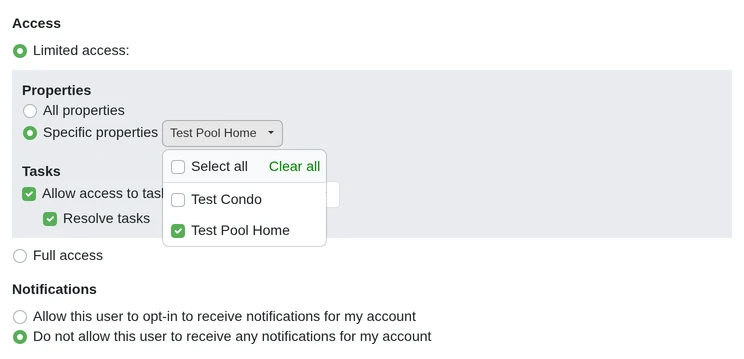
We logged in as our assistant, held to the pool home. Its menu had four items, Bookings, Inbox, Quotes and Tasks; it added a task and resolved it, and the condo's booking answered Permission denied. It could also open a pool home booking's cancel page, with its refund choices, and its delete page, which warns "This action cannot be undone!" The four items aren't the fence, though: settings pages opened from their web addresses with their buttons live, pricing, email templates, channel connections, bank accounts and API tokens among them, while the trigger list, reports and billing refused it. It couldn't switch on Rezzy AI, Property Management, texts or a hosted website, or invite staff. OwnerRez's own help says limited staff can only view and edit bookings, their financials and the inbox.
Weakest at: the setup is yours to do
OwnerRez's system messages go out on their own for routine events, from the booking confirmation and receipts to payment requests and date changes. Its setup wizard also switches on four written messages: a booking confirmation, a welcome email with the door code seven days before arrival, a checkout reminder and a review request. Read each before a guest does. With no door lock connected, the welcome email's line "your door lock code is" ends in nothing; the checkout reminder goes at 9 on checkout morning and talks about tomorrow's departure; and a booking you enter by hand sends the guest two confirmations, OwnerRez's and the wizard's, until you untick one. Each booking site also takes different fields, rules and fees, which OwnerRez documents channel by channel. The reviews on OwnerRez's own pages mention the learning curve too, five-star ones included.
The trap is timing. A scheduled trigger runs once, at its time, and by default it doesn't try again. We booked the same guest the day before arrival at both our test properties: the arrival details went out only where the trigger had a retry, and the wizard's welcome email never ran at either. The arrival message in OwnerRez's library also comes set to send only to a booking paid in full with a security deposit scheduled, so if you don't take deposits through OwnerRez it never goes until you change that. Give each arrival message a retry, such as every day until arrival, before real guests depend on it.
AI replies cost extra. Rezzy AI, which drafts answers from your booking data and can send them for you, is $9 a listing a month: $90 at 10 listings and $450 at 50, more than the base price.
Build three messages, then book a late guest
OwnerRez's price only holds up if its messages work, so make the 14-day trial prove them on one real listing.
The messages: we took the arrival details, a check-in the morning after arrival and a checkout reminder from OwnerRez's library. All three came as drafts on Do not retry, and the arrival details came set for five days out and only for bookings paid in full with a deposit scheduled. We made it three days, took off the payment and deposit conditions, and gave it a retry every day until arrival.
A late booking: we booked one guest at both properties at 6 in the morning, arriving the next day. At the pool home, where the trigger retried, the arrival details went out at 9:10 that morning, ten minutes after the retry's hours began and a day before arrival. At the condo, under a copy with no retry, OwnerRez marked them Will Not Run the moment the booking was made, and they never went. The wizard's own welcome email didn't run at either. A third guest, booked at the condo after the trigger's send time for her dates, got Will Not Run too, in OwnerRez's words because the booking was created after the run date.
The channels: connect Airbnb and Vrbo, change a rate and a minimum stay in OwnerRez, and check both sites.
Your assistant: invite them with limited access to one property and have them answer a guest from the inbox. We invited ours with limited access to the pool home alone, tasks included and notifications off, then logged in as them: a task went from added to resolved, and the condo's booking was refused. The invitation link lasts seven days, so send it the day they start.
If all four work, the price does the rest. If you'd rather run a system built around guest messaging, my Hospitable review covers it, and Professional there is $179 a month at 10 listings. For owners and a team that needs detailed permissions, see my Hostaway review. OwnerRez vs Hospitable prices the two with a pricing tool counted, and Lodgify vs OwnerRez prices the same booking website on both.
Hand your assistant the trigger list
Invite your assistant as staff with limited access to the properties they cover, so they work the inbox, the bookings, the quotes and the tasks for those listings only. On day one, walk them through your trigger list: which messages go out on their own and when, so they know what's theirs to send and which late bookings need a hand. OwnerRez's Trigger Forecast lists the messages still due to go out, but a limited-access login can't open it, or the trigger list: ours got Permission denied. So watching the triggers stays with you, and your assistant works from each booking's Messages tab, which their login does open, with Send Again beside the booking's messages.
Our assistants already work in OwnerRez, alongside the tools they train on before they start: Hostaway, Guesty, PriceLabs and Turno. See what an Airbnb virtual assistant takes off your plate, or book a free consultation to scope the role.