

Where Turno earns its fees
Turno does one job, the turnover. It reads your booking calendar, puts a clean on every checkout, offers it to the cleaner you've set for that listing and pays them when they mark it complete. Beside that sits its Marketplace, where local cleaners bid on your listing, and when a Marketplace cleaner cancels or doesn't show, Turno's support looks for a replacement. It's an official Airbnb software partner, and more than 126,000 cleaners are listed on it.
I run my rentals fully remote, and every week my cold callers get three markets to focus on. A lease in a new market needs a cleaner before it needs a guest, and finding one from another state is the job Turno's Marketplace does. Scheduling the cleaners you already have is the part your property management system (PMS) may already do, so that's the part to test before you pay for it.
Buy it if
- You open listings in cities you don't live in and need cleaners there, with someone to find a replacement when one doesn't show.
- You pay cleaners per clean and want the money to go out when the job is marked done.
- You want every change to reach your cleaner without a call from you. When we moved and then cancelled a test clean, our cleaner saw each change in the app at once and in an email within two minutes.
- You want proof of every clean: the checklist, the photos, and when the cleaner started and finished.
Skip it if
- Your cleaners are set and your PMS already sends them every clean, so you'd pay twice for scheduling.
- You'd want to move a cleaner you met on Turno off the app later. Its rules keep that connection, and every payment, on Turno.
- You want one app for guests and cleaning. Turno only knows the turnover; messages, pricing and channels stay in your PMS.
Turno pricing: what "free" costs at 10, 25 and 50 listings
Turno charges by listing, and only for listings where a cleaner you brought yourself is switched on. A listing covered only by cleaners you found on its Marketplace pays no subscription, at any count, and neither does a single listing. We ran one listing with our own cleaner through three cleans, and Turno never asked for a card.
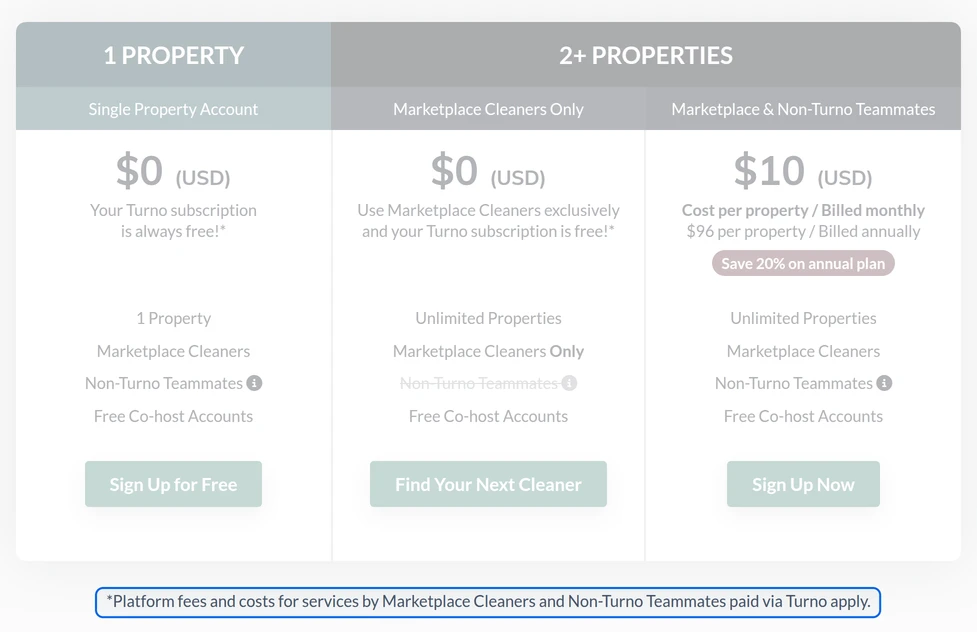
| Plan | 10 listings | 25 listings | 50 listings | What else you pay |
|---|---|---|---|---|
| Your own cleaners, billed monthly | $100 | $250 | $500 | $10 a listing with one of your own cleaners switched on. Paying them through Turno adds 3.9% by card or 1.5% by US bank transfer, $1.50 at least either way; paying them outside Turno adds nothing. |
| Your own cleaners, billed yearly | $80 | $200 | $400 | $96 a listing a year, paid up front: $960, $2,400 or $4,800. Not refunded if you cancel. |
| Marketplace cleaners only | $0 | $0 | $0 | No subscription. Every payment to these cleaners goes through Turno at 8% by card or 5% by bank transfer, $1.50 at least. |
The fees are why the free plan often costs more. At 5%, a listing's Marketplace fees pass the $10 subscription once its cleaning costs more than $200 a month; by card, at 8%, once it passes $125. Four cleans a month at $75 already clears both. Bring your own cleaner wherever you have one, and keep the Marketplace for the markets where you don't.
Your cleaner pays too, if you met on the Marketplace: 5% of each payment. Cleaners you bring pay nothing to be paid through Turno, and in the US, Marketplace cleaners buy a background check to join and renew it every year. Card payments reach them in 2 to 5 business days, bank transfers in about 7.
Prices in US dollars. The yearly plan is paid up front and isn't refunded if you cancel. A 14-day free trial starts when a second listing becomes billable. Lodgify's Ultimate plan includes a Turno subscription, and Turno says some other PMS partners include one too, so ask yours before you pay. For a large portfolio, Turno quotes a custom plan.
One turnover in Turno, from checkout to payment
Every checkout becomes a clean
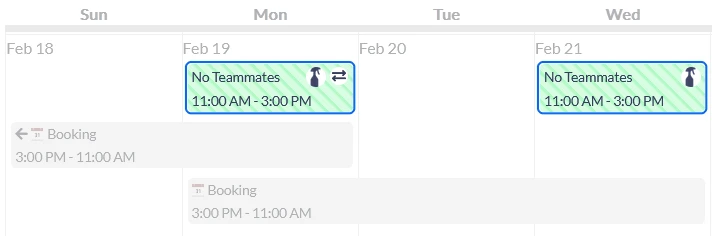
Connect your PMS, or your Airbnb and Vrbo calendars, and Turno creates a clean on every checkout in the window you set for that listing. A clean no cleaner has taken yet shows striped and marked No Teammates. Turno's setup starts at that calendar and lets you skip it, with one warning: "you will not be able to accept a bid from a Marketplace teammate until you sync a calendar."
A primary cleaner, then a backup
Each listing gets a primary cleaner, offered every clean first, and backups, who see it only once every primary has said no. If nobody takes a clean, Turno can open it to your backups on its own, 1 to 10 days before it's due, once you switch that on under Settings, Projects. Auto Assign skips the asking and puts one cleaner on every clean at a listing, and a cleaner you invite allows it unless they switch it off. A cleaner who already has a Turno account joins your team the moment you invite them; then you set their priority and price for each listing. The price starts at $0.00 an hour, so switch it to a price per project for a flat rate.

What your cleaner sees
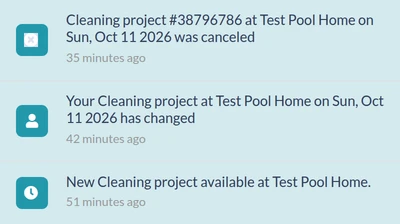
The offer reaches your cleaner in Turno's app with the date, the window, the checklist, the rooms and your notes, and by email with the date and window and a link to the rest. It leaves out the pay. Hide project price is ticked by default for cleaners you bring, so our cleaner's offer showed no price, and the $120 first appeared as Total Earned on the finished clean. Untick it in the listing's Advanced Teammate Settings if your cleaners should see the pay before they accept.
Every change reaches your cleaner
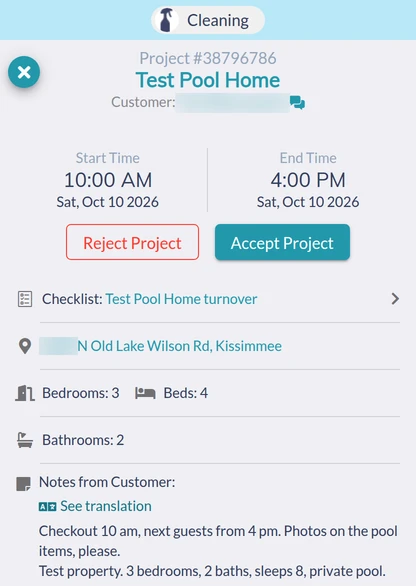
Accepting a clean doesn't freeze it. When we moved an accepted clean a day later, it stayed with our cleaner without a second yes, and Turno told them in the app at once and by email within two minutes: "Your Cleaning project at Test Pool Home has changed", with the new date and window but not the old one. Deleting it sent "Project canceled at Test Pool Home" the same way.
A report on every clean
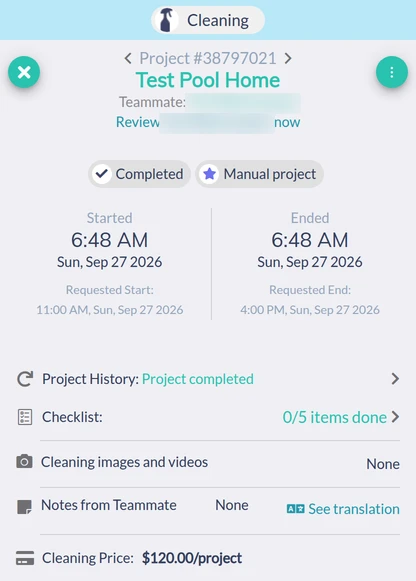
When the cleaner marks a clean complete, you see when they started and finished against the window you asked for, how many checklist items they ticked, and their photos, which you can download with a certificate for a dispute with a booking site. Our test clean closed the minute it started, with none of its five items ticked and no photos, though three items required one. A photo requirement only binds an item the cleaner ticks.
The setting that makes the report proof
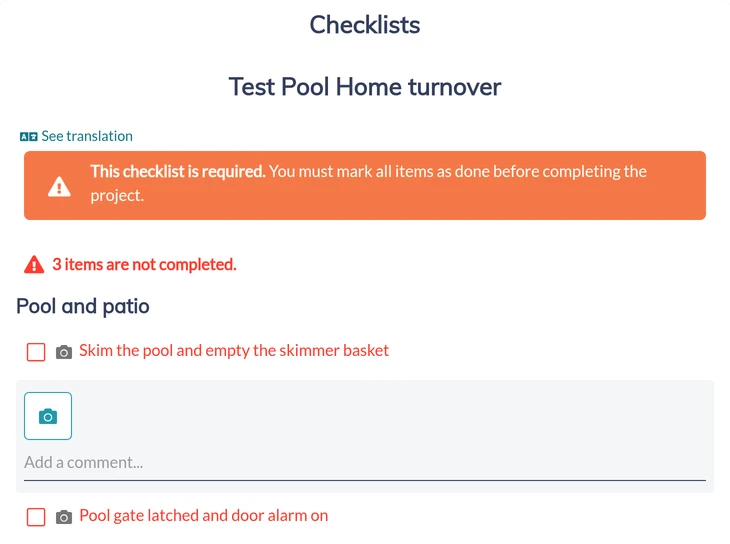
Mandatory Checklist Completion, under Settings, Projects, is off until you switch it on. With it on, Turno held another of our cleans at two of five items until the photos were in. Photos can go in from a computer too; ours, uploaded as files, came back stamped "Date/time not available".
Paid when it's marked done
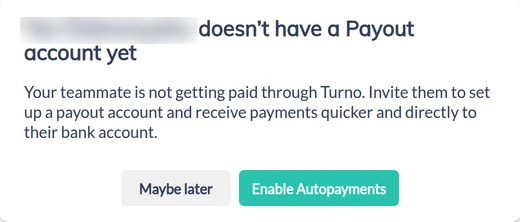
Marketplace cleaners are always paid automatically when they complete a clean. For cleaners you brought, auto pay is off until you switch it on for each one, and it only pays cleans completed after that. First, your cleaner sets up a payout account with Stripe. Ours hadn't, so Pay on the finished clean stopped at a notice that they didn't have one, and the one-off payment form had no cleaner to choose. Turno states its fee before it asks for your card: 3.9% by card or 1.5% by US bank transfer, $1.50 at least either way, which is $4.68 or $1.80 on our $120 clean. Tips, reimbursements and extras go out as one-off payments, and Stripe, Turno's payment processor, sends 1099-K forms to US cleaners who qualify.
Weakest at: what it doesn't import
Turno is only as right as the calendar it reads, and three things don't come across on their own. Check-in and checkout times aren't imported from any calendar; Turno fills in an 11:00 am checkout and a 3:00 pm check-in, and you set the real ones for each listing. A calendar feed (iCal) can't tell a blocked date from a booking, so a date you block gets a clean too, where a direct integration with your PMS knows the difference. And a new listing isn't added until someone links it in Turno.
Three defaults work against the proof until you change them. Mandatory Checklist Completion is off. A checklist you write is made available to other hosts as a template unless you switch Public off before you create it. And a clean you add by hand takes Turno's 26-item Default Checklist unless you pick yours.
The Marketplace has a cost that outlasts the search. Every payment to a cleaner you met there goes through Turno, fee included, for as long as you work together, and its rules forbid taking that cleaner off the app or even swapping phone numbers before you accept a bid.
Put one listing through it, free
Turno costs nothing on a single listing, even with your own cleaner, so test it against the cleaning tasks your PMS already has before you pay for the rest.
The setup: connect one listing through your PMS integration, set its checkout time and cleaning window, and add your cleaner as primary and a second as backup. We added our test pool home by hand, with no calendar, and put our own cleaner on it as primary at $120 a clean. Turno never asked for a card.
A change: extend a test reservation by a night, then cancel it. The clean should move, then disappear, and your cleaner should hear both times. We moved an accepted clean by a day, then deleted it. It stayed with our cleaner without a second yes, and they heard both times, in the app at once and by email within two minutes.
A no: have your primary decline a clean and time how long it takes your backup to get it. We had one cleaner, so this step waits on your second.
The proof: on the first real clean, read the report: start and end times, checklist, photos. Our cleaner started three and a half hours before the window and finished in six minutes, five of five items with three photos. With the checklist left optional, the next clean closed the minute it started with nothing ticked.
If your PMS's own tasks do all four as well, keep the $10 a listing. Hostaway, Guesty and Hospitable all create cleaning tasks from reservations, and Lodgify's Ultimate plan comes with Turno.
Mapping the rest of your stack? The Airbnb automation software guide shows which tool owns which job.
What your assistant does in Turno each day
Turno schedules the cleans, and someone still has to watch the schedule. That work is a routine, which makes it the easiest work to hand over. An assistant's day in Turno:
- Each morning, cover every clean that has no cleaner: a nudge to the primary, then the backups, then a Marketplace search. A clean's Project History shows whether the cleaner has viewed the offer.
- When a guest extends, leaves early or cancels, check that the clean moved with the booking and the cleaner saw it.
- After each clean, read the report and send any problem to your handyman with its photos.
- Fix a failed payment before your cleaner has to ask, and send tips and reimbursements as one-off payments.
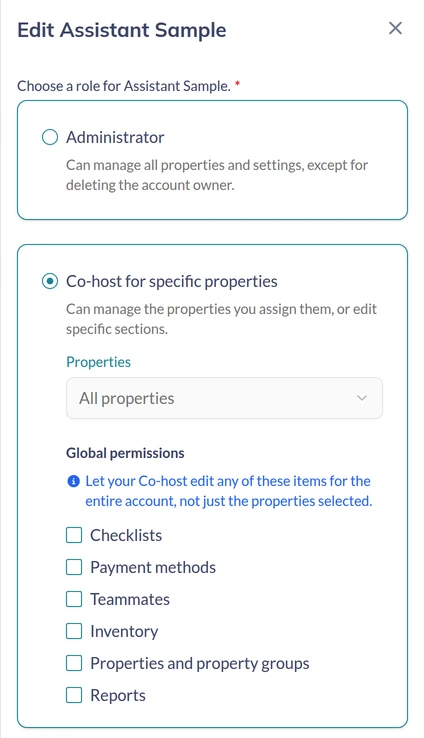
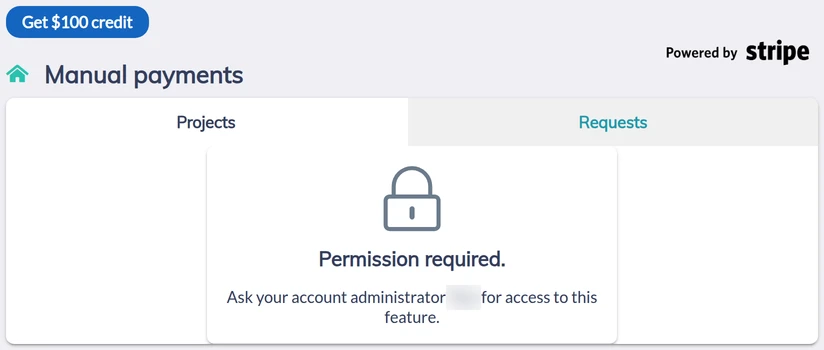
Our property-management assistants train on Turno before they start and every month after, with the recordings sent to you. Give yours a free co-host login. Turno offers Administrator or Co-host for specific properties and picks the second for you; choose the listings, then tick only the account-wide permissions the work needs from Checklists, Payment methods, Teammates, Inventory, Properties and property groups, and Reports. All six start unticked. We logged in as our co-host with none ticked. It saw every clean and its report, and added and deleted a clean, which Project History credits to it by name. Cleaner search and every payments page answered Permission required, so the morning's Marketplace search needs Teammates, and tips, reimbursements and failed payments need Payment methods. Unticked isn't hidden everywhere: the Reports builder opened for ours, and My team's Invite to team and the New Property button were there too.
See what an Airbnb virtual assistant takes off your plate, or book a free consultation; most placements take 3 to 4 days from the first call.