

Who Lodgify suits
Lodgify is property management software built around its booking website: a site you make from its templates that takes bookings and payments with no booking fee, and on the higher plans gets listed on Google Vacation Rentals. Around it sit a channel manager for Airbnb, Vrbo and Booking.com, one inbox for every guest, automated messages and, on the top plan, tasks and owner statements.
So the question is how much of your business the website is, or will be. If nearly every booking comes from Airbnb and always will, you're paying for a site you won't use. If you're building a name that guests come back to and book directly, the website is the point, and it's the reason to pick Lodgify.
Buy it if
- Your own website takes real bookings, or you're working to make it.
- You sell on Airbnb, Vrbo and Booking.com and want one calendar and one inbox for all three.
- You want the price up front, a 7-day trial without a card, and month-to-month billing.
- You take late bookings. A message timed days before arrival still goes the minute a late booking is confirmed.
Skip it if
- Nearly all your bookings come from Airbnb, so the website would sit idle.
- You sell on smaller sites that need rates kept in sync, not just dates. Lodgify connects those by calendar feed.
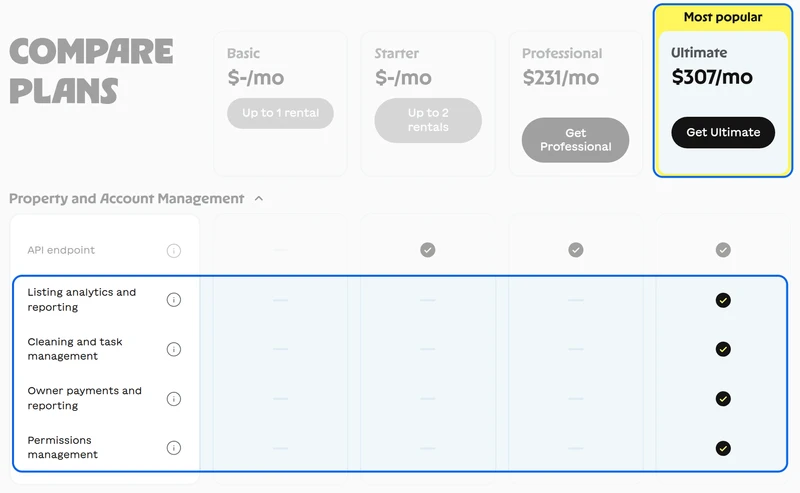
- You manage for owners on a tight budget: tasks, owner statements and permissions are all on Ultimate.
Lodgify pricing at 10, 25 and 50 listings
Lodgify prices by the number of properties, and its two cheapest plans stop early: Basic covers one rental and Starter two. From three properties on, you're choosing between Professional and Ultimate.
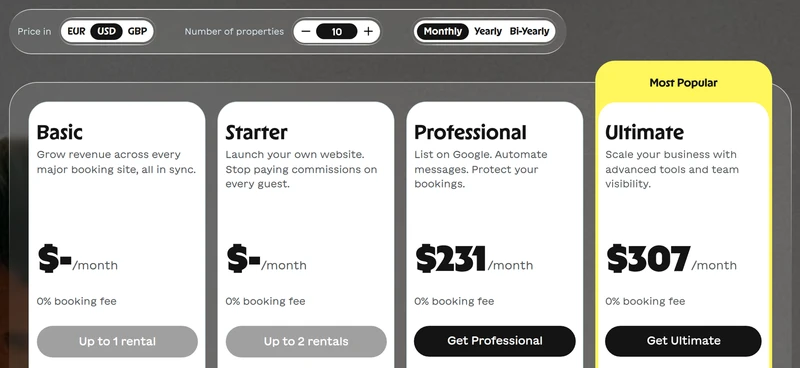
| Plan | 10 listings | 25 listings | 50 listings | What the plan adds |
|---|---|---|---|---|
| Professional | $231 | $421 | $696 | Booking website, automated messages, a Google Vacation Rentals listing, email and phone support |
| Ultimate | $307 | $574 | $968 | Adds tasks, check-in and checkout automation, owner payments, reports and statements, a guest app and a free Turno subscription |
| Basic and Starter | No | No | No | Basic is for one rental and Starter for two |
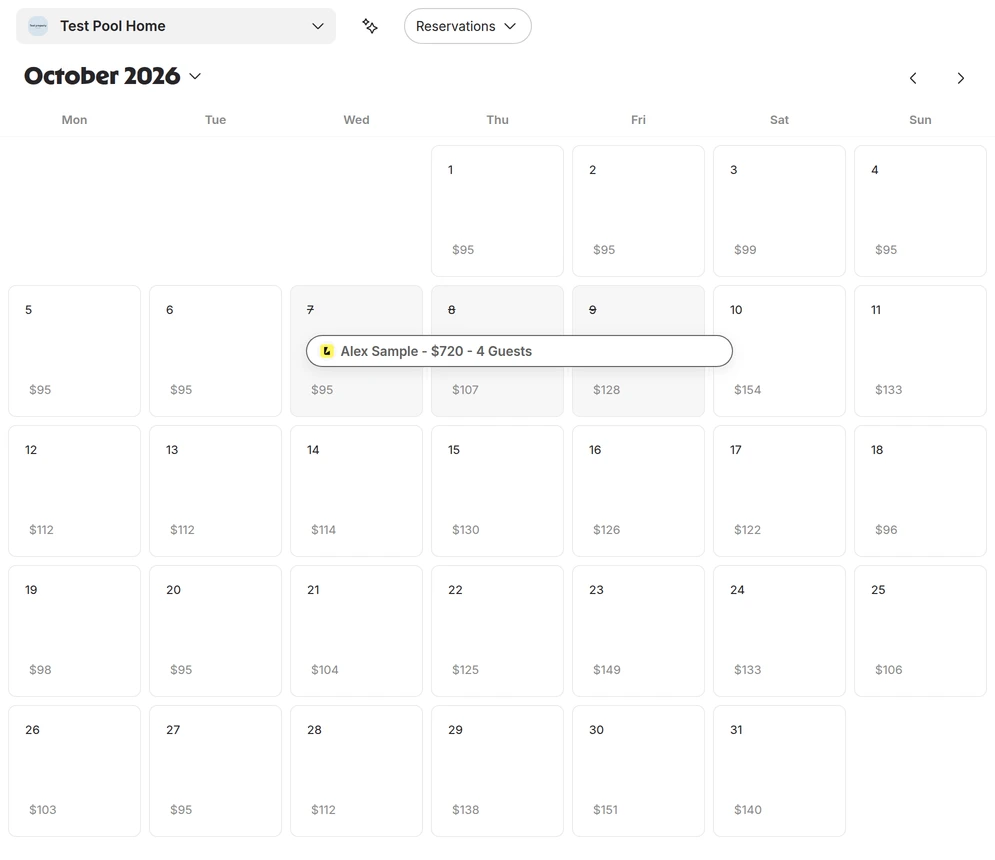
Monthly billing in US dollars, before tax. Every plan has a 0% booking fee, there's no setup fee and onboarding is free, and you can cancel any time. Yearly billing costs less. Professional and Ultimate include Lodgify's own dynamic pricing at no extra cost, and the trial's own plan cards say so at the monthly price; in the trial itself, its setup reads "Free for 3 months". It starts from Beyond's suggestion: for our test pool home in Kissimmee it proposed a $159 base price and a $95 floor, against the $185 we charge. We switched it on with those, and no October night reached $185. It priced our three test nights at $95 on Tuesday 20 October, $133 on Saturday 24 October and $203 on Saturday 28 November, Thanksgiving weekend, where Wheelhouse priced the same home at $104, $125 and $133. Set your own base price and floor before you switch it on.
What you'll work in every day
One inbox for every guest
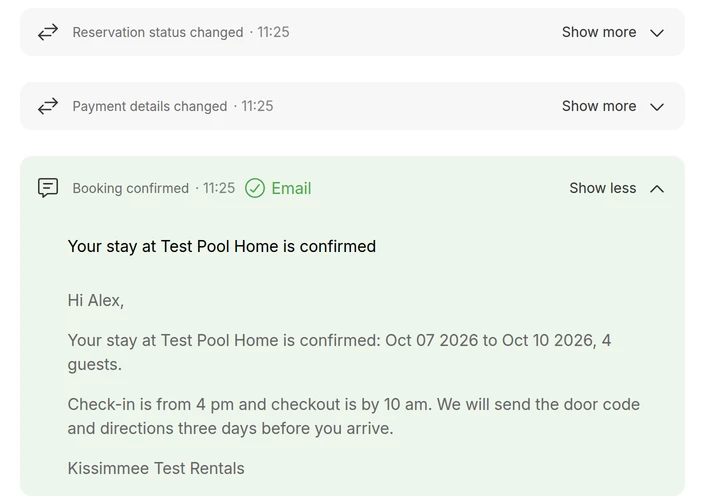
Messages from Airbnb, Vrbo, Booking.com and your own website land in one list, each in a thread tied to its reservation. The thread also logs every message Lodgify sent on its own, as the guest got it, and its AI assistant drafts replies from your property details for you to check before they go.
Messages that send themselves
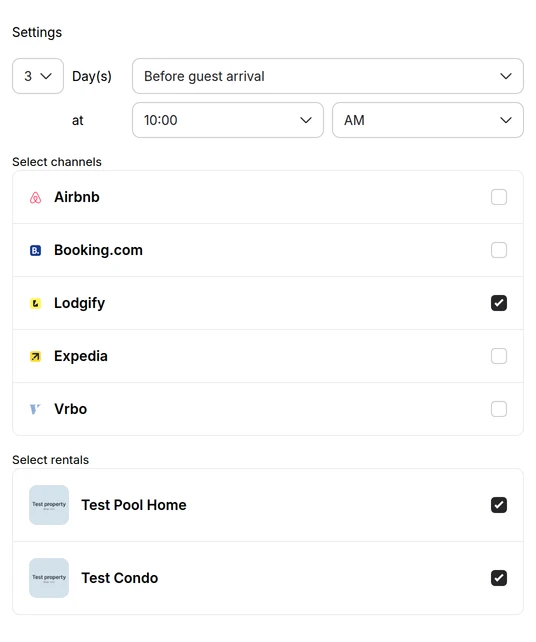
A new account starts with Lodgify's own messages already switched on for your direct bookings, from the booking confirmation to a check-out reminder, each signed with your name and phone number, so rewrite them before your first guest books. A message you add goes a set number of days before or after arrival, departure or the booking, at the hour you pick, to the rentals and booking sites you tick. Book a guest after that moment and it goes at once: our arrival message, timed three days out, reached a guest who booked the day before arrival the minute the booking was confirmed. Every plan sends the ready-made messages; your own start on Professional, texts need Ultimate, and only the main account holder can set them up.
Owner statements, on Ultimate
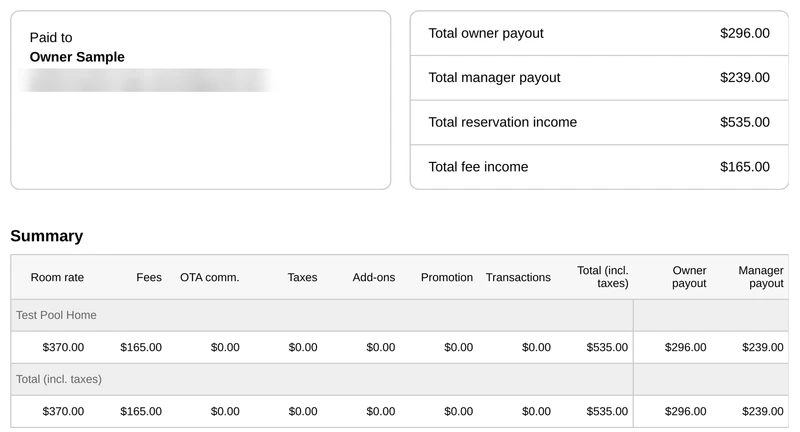
If you manage for owners, Ultimate builds each statement from the bookings, fees and expenses already in Lodgify, once or on a recurring schedule, and downloads it as a PDF or a spreadsheet. The split comes from payout rules you set for each owner, and every new owner starts at 100% of the room rate to you and 0% to them, so set the split before the first statement.
Weakest at: paying for the website either way
Professional works out to $23 a listing a month at 10 listings and about $14 at 50. That's a fair price when the website takes real bookings. When nearly everything comes from Airbnb, the best Airbnb management software comparison shows systems that cost less at 10 and 25 listings.
A team pushes the price up again. Cleaning tasks, owner reporting and setting what each person can see all sit on Ultimate, about $31 a listing at 10 listings.
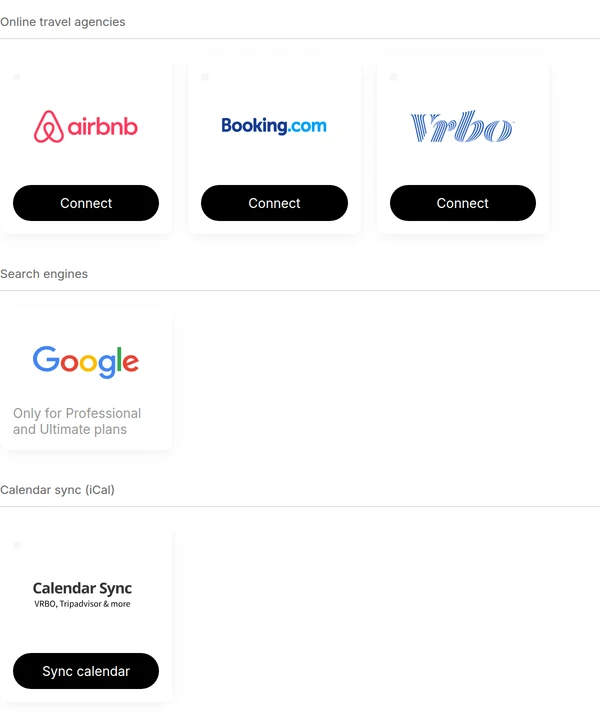
Lodgify connects Airbnb, Vrbo and Booking.com directly. In the trial its channel manager offers exactly those three and a calendar feed for everything else, with no Expedia to connect, and it keeps the Google Vacation Rentals listing for Professional and Ultimate. A calendar feed blocks booked dates but carries no rates or messages. If channels matter more to you than the website, the best Airbnb channel manager comparison covers that narrower job.
Take one direct booking all the way through
Lodgify's case rests on the website, so test the website. Lodgify's trial gives you seven days, enough for one listing: it opens on Connect Airbnb, so close that screen to add a rental by hand, and have five photos ready, because the rental form won't pass its third step without them. Every guest message the trial sends goes to your own email, not the guest's. Lodgify pays Plug N Play a commission if you subscribe through that link.
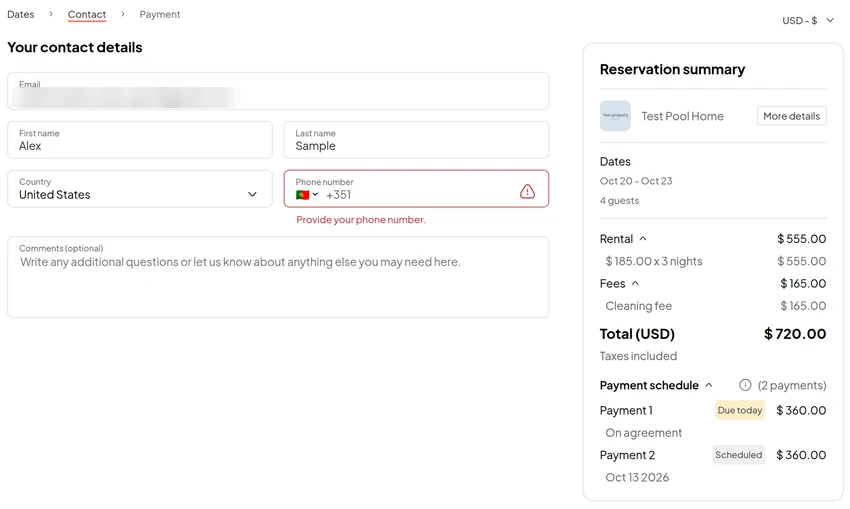
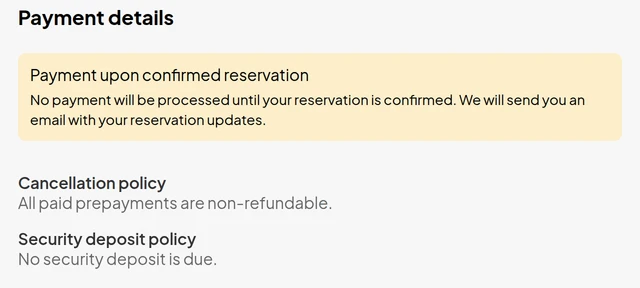
The booking: book a test stay on your site's preview as a guest would, at the rate, minimum stay, cleaning fee and cancellation rule you use on Airbnb. Ours priced three nights at $720, $185 a night plus the $165 cleaning fee, half due now and half seven days before arrival. The form won't go on without the guest's phone number, though it doesn't mark the field as required. With a number in and no payment gateway connected, the last step asks for no card: "No payment will be processed until your reservation is confirmed," and the guest's button reads Agree. A direct booking then stays tentative until you mark the deposit paid yourself.
The channels: the dates close on Airbnb, Vrbo and Booking.com. We connected no channel, so run this line on a listing you can spare.
The guest: the confirmation and your check-in message go out on their own. Ours went the moment the deposit was marked paid, and a guest who booked the day before arrival still got our three-days-out arrival message the same minute.
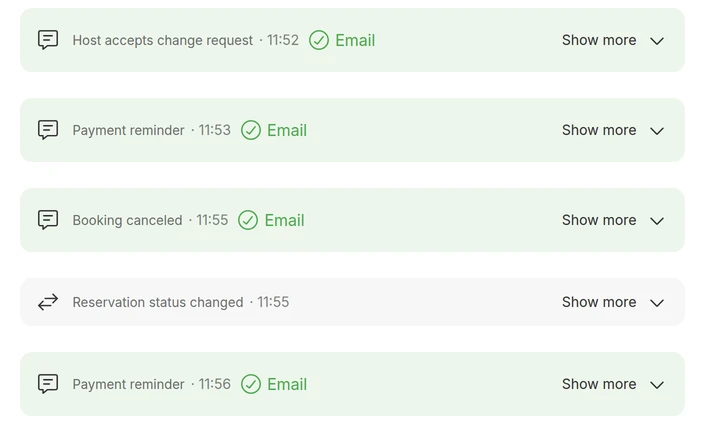
The change: move the dates, then cancel, and watch the refund, the calendar and the scheduled messages follow. Adding a night kept the old price until we pressed Update, then asked for $67.50 more deposit and marked it overdue at once. Cancelling reopened the dates and kept the non-refundable deposit, but the guest got a payment reminder a minute after the cancellation email, and that reminder can't be switched off.
Buy it if every line comes out right without you retyping anything. Comparing it with another system? Hostaway vs Lodgify puts both through the same booking, Guesty vs Lodgify runs one owner's month through both, Lodgify vs Hospitable works out where the prices cross, and Lodgify vs OwnerRez prices the same website setup on both.
Give your assistant a login of their own
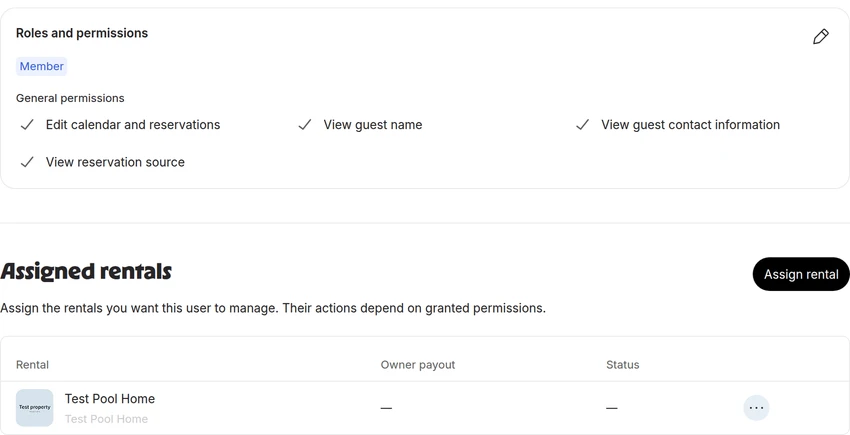
On Ultimate, permissions let an assistant answer guests and keep calendars straight. We invited ours as a Member, the role that starts with nothing, and switched on four boxes for the pool home only: edit the calendar and reservations, see guest names, see guest contact details, which the inbox needs, and see the booking source. Open the saved user afterwards: ours had kept three permissions from a role we had only previewed. Starter and Professional give a co-host access instead, so check in the trial what that login can reach before you hand it over.
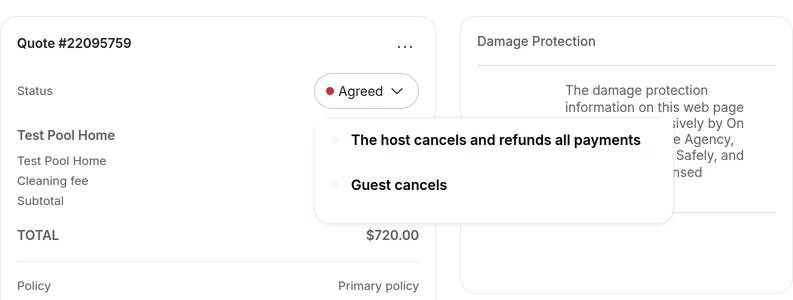
Then we logged in as the assistant. Its menu was down to Dashboard, Reservations, Inbox, Calendar and Settings, and it saw only the pool home's bookings and guest threads. It closed a night and reopened it, and left a note on a booking, without the reports permission Lodgify's own note asks for. Its Generate with AI button wrote a whole reply to our test guest and signed it with your name, not theirs, so give your assistant your saved replies and have them read every sign-off. Automate offered quick replies only: the scheduled messages stay with you. Two things reach further than four boxes suggest. The status menu on a booking's quote offered our assistant The host cancels and refunds all payments, and the channel manager, left out of its menu, still opened from its web address with every Connect button live. We pressed neither.
We place trained Airbnb virtual assistants who work your inbox, reservations and calendars within the limits you set; you walk them through your Lodgify account when they start. Book a free consultation to scope the role.