

Who Stessa suits
Stessa calls itself asset management software for owners of residential rental property. It pulls transactions in from your banks and cards, sorts them into categories that map to Schedule E, the IRS form most rental income is reported on, and builds an income statement and cash flow by property. Rent collection, tenant screening, leases and its own bank accounts sit around that.
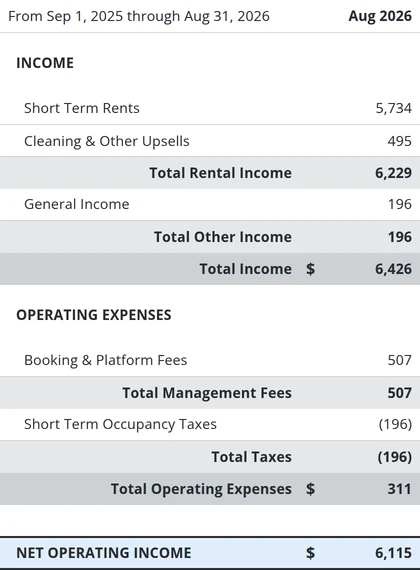
The part that matters for a short-term rental is easy to miss. Airbnb lets you download your transaction history as a CSV file, a spreadsheet, and Stessa reads it as it is. We imported a sample in Airbnb's export format, and each booking came in as three lines: the nights under Short Term Rents, the cleaning fee under Cleaning & Other Upsells, and Airbnb's fee under Booking & Platform Fees. A bank feed can't give you that split, because the bank only sees the payout.
My portfolio is rental arbitrage, so there's no purchase price, mortgage or equity on my side, and Stessa gives a whole dashboard card to net worth. The ledger and reports underneath work the same for a leased unit as for one you own.
Buy it if
- You keep your own books and want each stay's rent, cleaning fee and Airbnb's fee on separate lines without paying for a connector.
- You'll download and import each listing's Airbnb file every month, or have your assistant do it.
- You own some of your rentals and want their value, loans and equity tracked next to the books.
Skip it if
- Most of your bookings come through Vrbo or Booking.com. The importer is built for Airbnb's file.
- A bookkeeper keeps your books in QuickBooks or Xero. Stessa is a ledger of its own and exports rather than syncs.
- You want rules that file recurring charges your way. Stessa categorizes on its own, and you correct it in bulk.
An Airbnb month in Stessa
Airbnb's file, one listing at a time
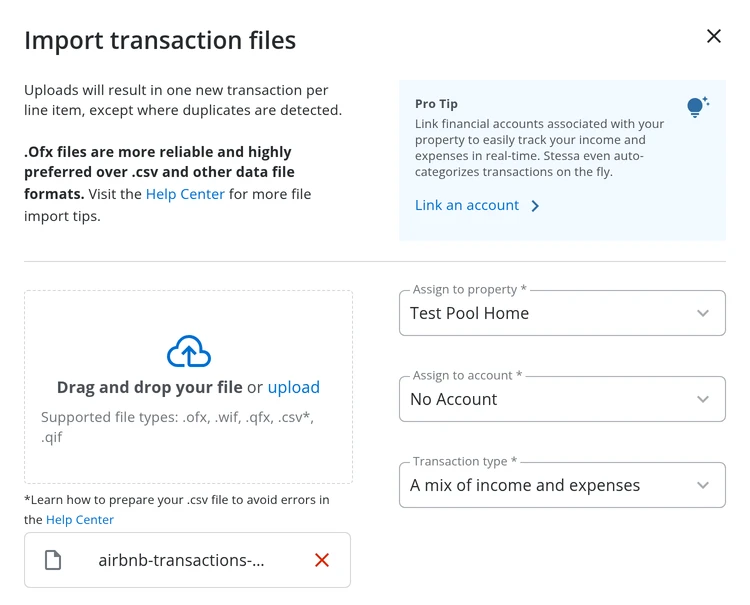
In Airbnb, open your transaction history, filter it to one listing and last month, and download the CSV. On Stessa's Transactions page, choose Import, pick the listing, set the type to a mix of income and expenses, and upload the file as it is: there's no column to map. Assign the property as you import, because a file imported without one leaves every line to be matched by hand. Importing the same file again added nothing, so an overlapping download won't double a month.
What one stay becomes
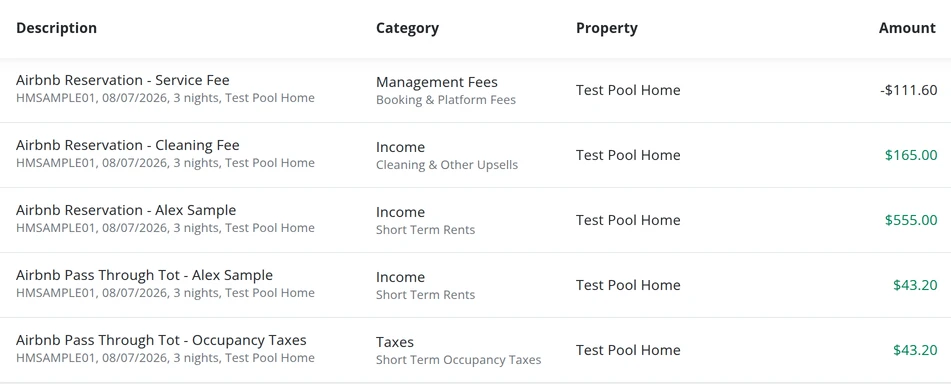
Our sample's first stay, three nights at $185 with a $165 cleaning fee, came in as the nights, $555, under Short Term Rents, the cleaning fee under Cleaning & Other Upsells, and Airbnb's 15.5% fee, $111.60, as a negative line under Booking & Platform Fees, all filed to the listing with nothing left to review. Check the tax lines after each import. Where Airbnb passes a local tax through to you, ours came in twice, once as rent and once under Taxes, and neither went to Taxes to Remit, where Stessa's own guide files tax you collect. Move one line there and delete the other.
A bank account for each listing
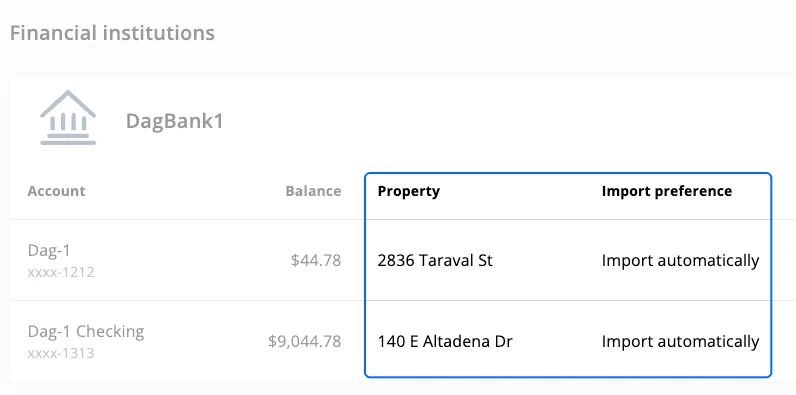
Connect the account each listing's money runs through and assign it to that listing, and everything it imports is filed under the listing automatically, with up to six months of history. The payouts it brings in repeat what the Airbnb file already recorded, and Stessa doesn't catch them: when we imported the month's six Airbnb payouts as a bank file, all six landed as new income, the booking payouts filed as Short Term Rents, and nothing went to Needs Review. Search the payouts, tick them all and delete them in one go. If you'd rather bank with Stessa, its Cash Management accounts at Thread Bank open one per property, as many as you like, each with its own debit card, though no more than three can sit unfunded at once.
Stessa pricing: free to start, $15 a month for Schedule E
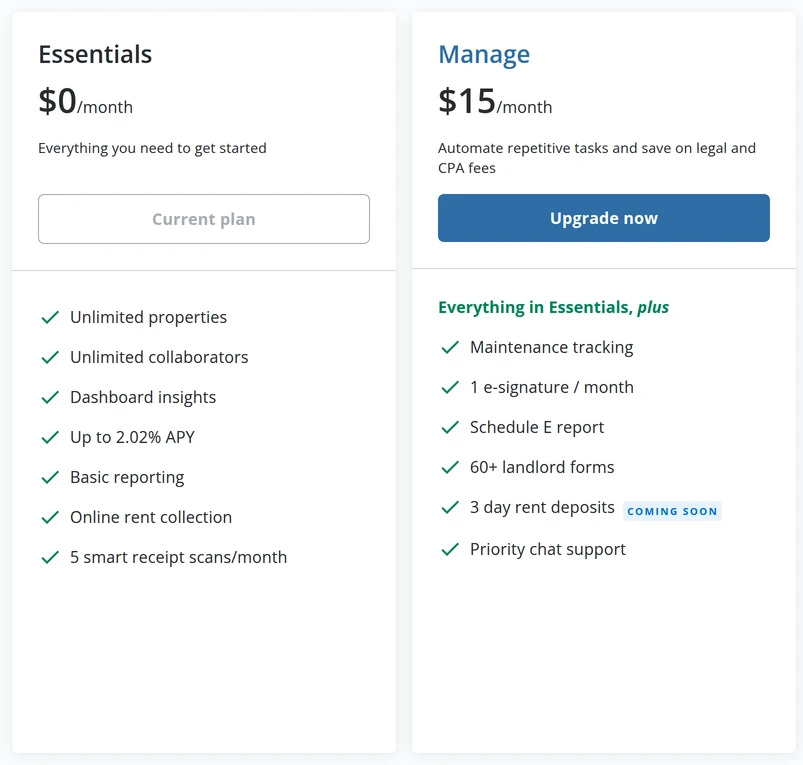
Every plan covers unlimited properties, so Stessa costs the same at 10, 25 or 50 listings. Essentials is free and already takes the Airbnb import and builds the income statement by property. Manage adds the Schedule E report for $15 a month, or $144 a year billed annually. Pro, $35 a month or $336 a year, adds the balance sheet and the other advanced reports, unlimited receipt scanning and a higher rate on Stessa's bank accounts. On Essentials the income statement and net cash flow reports open, and Schedule E sits in the report list behind an Upgrade badge.
| Plan | Price | What you get |
|---|---|---|
| Essentials | $0 | Unlimited properties, bank feeds, the Airbnb import, income statement and cash flow by property, a basic tax package, 5 receipt scans a month |
| Manage | $15 a month, or $144 a year ($12 a month) | Adds the Schedule E report, priority chat support, 60+ legal forms and one eSignature a month |
| Pro | $35 a month, or $336 a year ($28 a month) | Adds the balance sheet and capital expense reports, unlimited receipt scans and portfolios, budgets, phone support and a higher rate on Stessa's bank accounts |
Prices in US dollars. Paid plans renew on their own, and a monthly plan renews without a reminder. Cancel and you keep the plan to the end of the period you paid for; an annual plan isn't refunded for the months left. Before you pay for Manage only for Schedule E, ask your accountant whether the free plan's income statement by property already gives them what they file from.
Weakest at: a landlord's app you tidy up after
Stessa is built for landlords who own their property. Its dashboard puts net worth, your properties' value against their loans, beside your cash flow, and much of the menu is for tenants: leases, screening, rent collection and listings. With leased units, those parts sit empty, and the ledger and reports are what you'll use.
The upkeep costs more than the empty screens. You can't write rules: Stessa categorizes each transaction itself, and what it gets wrong you fix by hand or in bulk edits of up to 50 at a time, which can't be undone. Every month the import and the bank feed both record your Airbnb payouts, and nothing flags the repeats: with the bank's payouts in, our test month's net cash flow read $6,115, about twice the $2,959 Airbnb paid. And Essentials and Manage scan 5 receipts a month; past that, it's Pro, or uploading receipts without the scan.
If that's more upkeep than you want, the best rental property accounting software guide compares the other ways to keep the books, by who keeps them.
Import one listing's month, then split the same month in Baselane
Baselane is the free alternative with a bank account per listing, and its catch is the one Stessa fixes. We ran Stessa's half on a sample in Airbnb's export format: three August stays at our test pool home in Kissimmee. Time both routines on the same month.
The file: in Airbnb, download one listing's transaction history for last month as a CSV. Our sample month held three stays: $3,270 of nights and cleaning, $506.85 of Airbnb's fees, $196.20 of tax passed through and $2,959.35 paid out.
The import: import it on Stessa's free plan, assigned to that listing. Ours took no setup, and every stay came in as rent, a cleaning fee and Airbnb's fee, each in its own category.
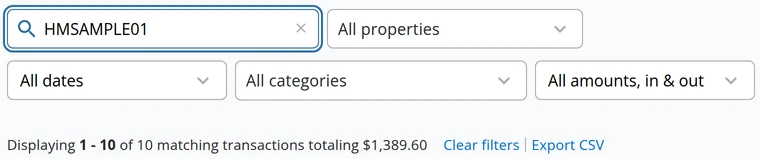
The repeats: the same payouts from your bank match nothing in the import. Our six, imported as a bank file, all landed as new income, unflagged; one search and one bulk delete cleared them.
The numbers: the month's income should match the listing's gross earnings in Airbnb, and the fees what Airbnb kept. Ours did, $3,466 and $507, but the tax passed through came in a second time under Taxes, so net cash flow read $3,156 against the $2,959 Airbnb paid. Check the tax lines before you trust the month.
Then split the same month's payouts in Baselane, where each lands net and gets its fee by hand. If the import is the lighter routine at your number of stays, keep your books in Stessa, and pay for Manage from the month your accountant needs the Schedule E. The Baselane review walks through the split, and Baselane vs Stessa puts the two side by side.
Write the import down once, then hand it over
The monthly routine never changes: download each listing's file, import it to the right property, delete the repeats, attach the receipts, check the month against Airbnb. Written down once, it's a checklist your assistant can run without you. Let one login do every import. Our assistant's Editor login imported our sample month, which the owner's login had already imported, and every line came in a second time: Stessa skipped a repeat when the same login imported the file twice, but not across two logins.
Invite your assistant to your portfolio as an Editor; the free plan let ours in. They can edit transactions and property details and see the dashboard, and they can't invite anyone: our Editor's collaborator list had no invite button. Stessa's help says an Editor can't add properties or manage portfolios either, yet our Editor's menus offered Add another property, Edit portfolio name and Delete property; we saved none of them. Even a Manager, the widest role, can't manage your linked bank accounts. Collaborators work with the paid features of the portfolio you invite them to, so your Manage plan covers them. Confirm your Stessa account's email first, with the code Stessa mails you, since the invite form stays greyed until you do. Access goes by portfolio, and the free plan has one, so your assistant sees every listing in it; separate portfolios take Pro.
We place a trained bookkeeping virtual assistant who prepares the records and the monthly handoff for your accountant, who keeps the final close. You direct the work, and after a one-time placement fee it's month to month. Book a free consultation to scope the role.